
TL;DR
Review professional profile photos every six months, with a replacement considered every one to three years when appearance and positioning remain stable. Refresh sooner after a noticeable appearance change or before a major career event, then update related profiles together.
A professional portrait should make its owner easy to recognize at the next interview, client meeting, or conference. A professional profile photo refresh schedule combines regular reviews with event-based updates, rather than replacing an image simply because another year has passed.
Photo refresh schedule: A recurring plan for checking whether a portrait still reflects someone's current appearance, role, and professional brand, then replacing or redistributing it when needed.
For professionals planning new imagery, Looktara offers a place to explore profile-photo options. The useful starting point remains a clear brief: current appearance, intended audience, and publishing date.
Table of Contents
How often should a professional headshot be updated?
A professional headshot should be reviewed every six months and considered for replacement every one to three years if appearance and professional positioning remain stable. A noticeable appearance change or a new public-facing role can justify an earlier update. These intervals are practical planning recommendations, not platform requirements or scientifically established deadlines.
Separate a photo review from a new portrait
A review doesn't automatically require a photo session. The existing image may still work if colleagues can recognize the person easily and its clothing, expression, and background fit the current role.
Check the portrait beside a recent, unfiltered photograph. Assess it at small avatar size, where a tight crop or distracting background becomes more obvious.
- Every six months: Check likeness, image quality, role fit, and consistency across active accounts.
- Every year: Consider new options for highly visible professionals, speakers, creators, and client-facing business owners.
- Every two to three years: Reassess the main portrait even when appearance and work remain stable.
These are checkpoints, not automatic expiration dates. A recent photograph that no longer looks like its owner needs attention sooner than an older one that still does.
A review date creates consistency; a meaningful change creates the reason to refresh.
Which events should trigger an earlier photo refresh?
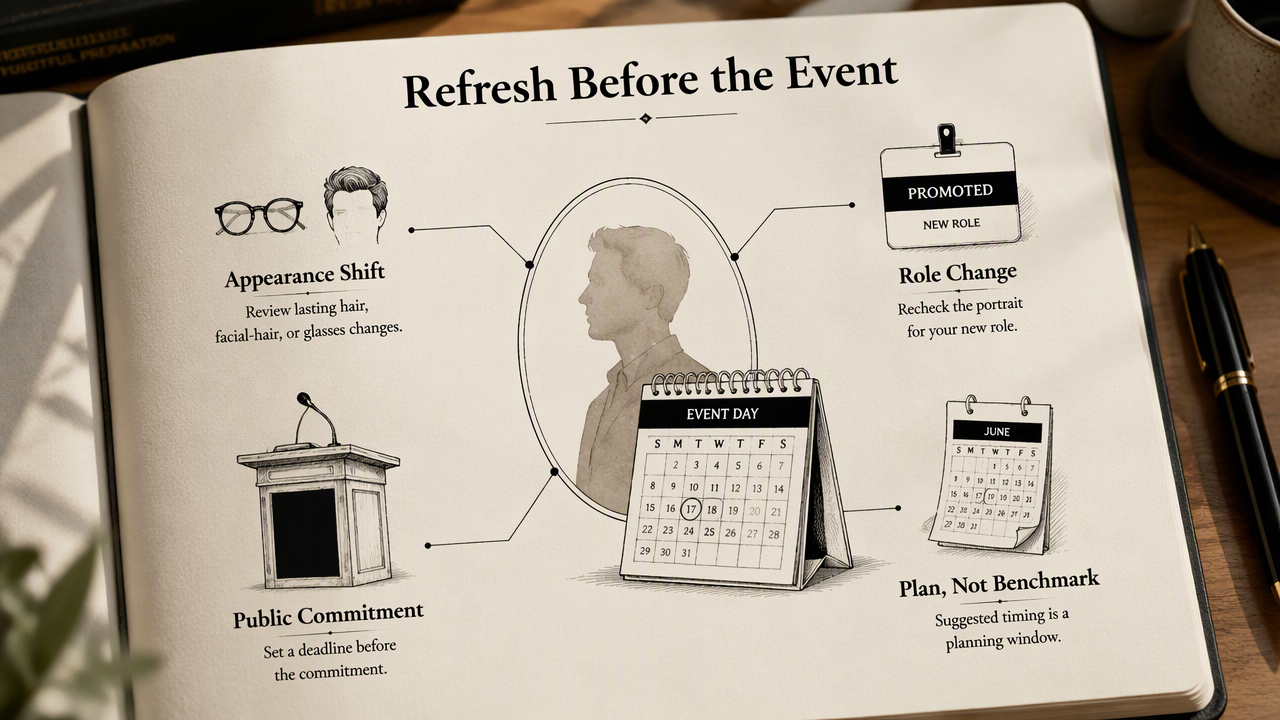
Appearance changes and upcoming public commitments should trigger an earlier photo review because they can change what the portrait needs to communicate. The timelines below are suggested planning windows, not measured performance benchmarks. Choosing a deadline tied to the event makes the update easier to complete.
Seven practical triggers and their timing
- Major appearance change: Review promptly after a lasting change in hairstyle, facial hair, glasses, or another recognizable feature. Replace the portrait when the difference would surprise someone meeting the person.
- Role change or promotion: Review when the new role is confirmed. Prepare an updated image before the announcement if the audience, dress expectations, or public responsibilities have changed.
- Active job search: Review before applications and networking outreach begin. A suitable existing portrait can stay; a new job search alone doesn't require a new photograph.
- Business or personal rebrand: Select the portrait alongside brand colors, messaging, and visual direction. Publish it with the rebrand rather than leaving the image as a separate task.
- Conference season: Work backward from the organizer's speaker-photo deadline. Allow time for selection, cropping, and approval before submitting the final file.
- Website redesign: Choose portraits before biography pages reach final layout. Designers need to know whether images are square, vertical, or wide, especially when text sits beside them.
- New service or audience: Review when the professional offer changes, such as moving from individual fitness coaching to corporate wellness consulting. The portrait should support the new context without suggesting a different identity.
Make room for approval, not just photography
The publishing deadline matters more than the date of the photo session. A business owner may need designer input; an employee may need a communications team's approval. Build those steps into the calendar and keep the approved image available for late requests.
Platform-by-platform photo refresh timing
Each platform should follow the same recognizable identity while using a crop and style suited to its audience. Professional accounts benefit from coordinated updates; creator and dating profiles may need different images. A matching face matters more than publishing the identical file everywhere.
Suggested review cadence for six profile types
| Platform | Suggested review | Refresh trigger | Publishing check |
|---|---|---|---|
| Every six months | Job search, promotion, appearance change | Clear face at small avatar size | |
| Email avatar or signature | With the main work portrait | New approved company portrait | Check account avatar and signature separately |
| Slack | With workplace profile updates | Appearance change or team onboarding | Confirm the crop remains recognizable |
| Website bios | Every six months and during redesigns | Rebrand, new role, speaker announcement | Check staff pages, author bios, and mobile layouts |
| Creator profiles | Each major campaign or positioning review | New niche, visual direction, or audience | Coordinate avatar with campaign imagery |
| Dating apps | Whenever appearance meaningfully changes | A portrait no longer represents current appearance | Use recent images that support recognition |
The intervals above are workflow recommendations. LinkedIn, Slack, and other services shouldn't be treated as having a universal headshot replacement deadline.
Keep the identity consistent, not the entire image
A freelancer can use a polished portrait on LinkedIn and a more relaxed photograph on a creator account. The expression and clothing can differ while the person remains immediately recognizable.
Fitness professionals exploring career-focused imagery can review fitness LinkedIn profile picture options. For a coaching business, the professional avatar and promotional content should be planned together but treated as separate assets.
How can a photo refresh be organized efficiently?
A photo refresh can be organized efficiently by separating image selection from publishing and keeping one approved asset set.
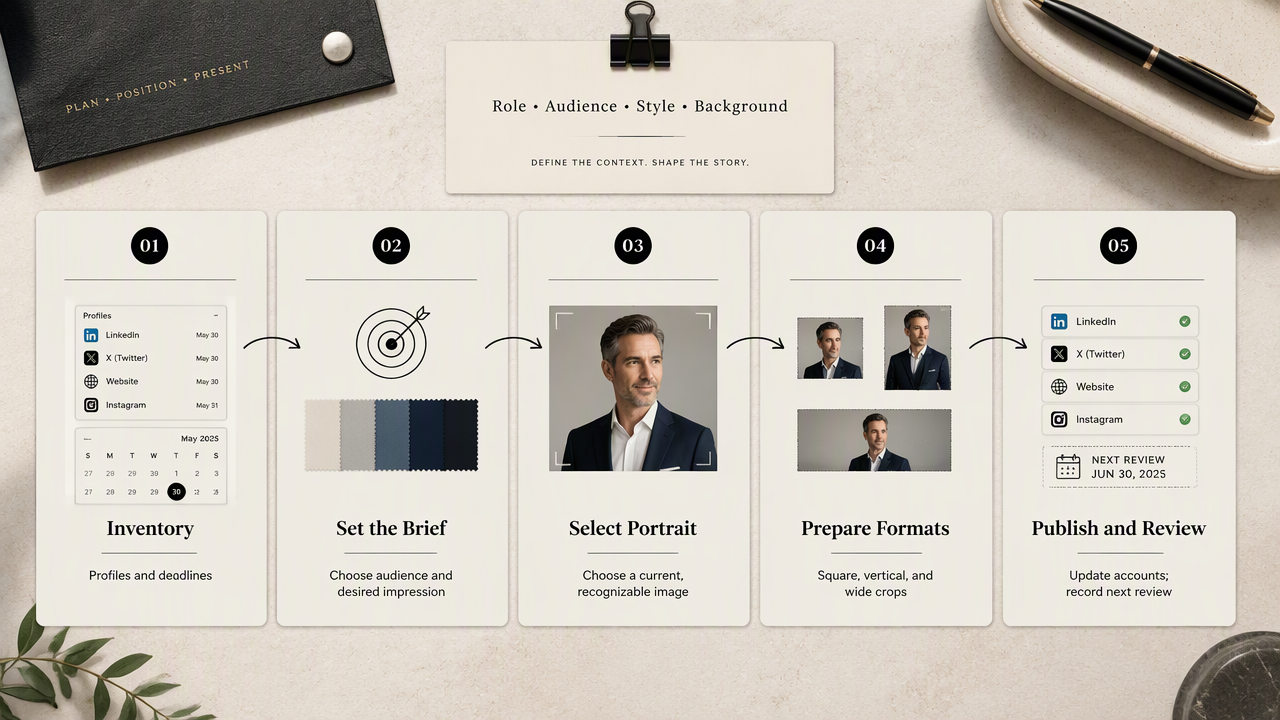
- Inventory active profiles and upcoming deadlines.
- Define the audience and desired impression.
- Select a current, recognizable portrait.
- Prepare platform-specific crops.
- Update related accounts together.
- Record the next review date.
Create a brief that makes selection easier
A useful brief names the role, audience, clothing style, background preference, and required formats. For example, a remote project manager might need a square work avatar, a vertical speaker portrait, and a wider website image.
Selection should focus on observable details: natural expression, accurate facial features, clear eyes, and clothing appropriate to the work. Keeping original files makes later crops easier without repeating the whole project.
How Looktara fits into the refresh workflow
Looktara can be considered during the image-options stage, after the purpose and publishing requirements are defined. That placement keeps the refresh focused on a specific task, such as preparing LinkedIn imagery for a new professional role.
A fitness business planning a broader campaign can also explore fitness Instagram product imagery options. Those assets serve a different purpose from a personal headshot, so the brief should identify which images represent the person and which promote the business.
Keep a simple portrait register
A small register prevents future updates from becoming a search through old folders. Record the portrait date, approved filename, account locations, and next review date. A filename such as portrait-2026-approved-square.jpg is easier to identify than a camera-generated number.
- Owner: Person responsible for approving the image.
- Locations: Profiles and pages using the portrait.
- Deadline: Next event requiring a current file.
- Review date: Calendar reminder for the next likeness check.
Frequently asked questions about headshot timing
Headshot timing depends more on current likeness and intended use than on the age of the file alone. These answers address common decisions about keeping, replacing, and adapting an existing portrait.
Does a new job always require a new headshot?
A new job doesn't always require a new headshot. An existing portrait can remain useful when it accurately reflects current appearance and suits the new organization's tone. A review is still sensible because a leadership role, customer-facing position, or company photography policy may call for a different image.
Can the same photo work on LinkedIn and dating apps?
The same photo can work on LinkedIn and dating apps if it looks current, natural, and appropriate in both settings. The audiences have different needs, though. A formal corporate portrait may suit professional introductions, while a dating profile may benefit from a relaxed image and other recent photographs showing everyday context.
Can cropping or editing replace a new photo session?
Cropping or light editing can extend a portrait's usefulness when the underlying photograph still represents the person accurately. Adjusting framing or brightness may solve a presentation issue. Editing cannot reliably substitute for a new portrait when appearance has materially changed or the intended use requires a different pose, setting, or format.
Decision checkpoint: Keep, recrop, or replace the image based on the specific requirement.
Conclusion
A useful professional profile photo refresh schedule starts with one calendar reminder and a list of active profiles. Set a six-month review, identify the next career or brand deadline, and prepare an approved portrait set for coordinated publishing. For professionals ready to explore new imagery, Looktara provides a next step at looktara.com, with the brief and required formats already defined.
Generated by EarlySEO.com