
TL;DR
A professional AI headshot can strengthen LinkedIn profiles, portfolios, business bios, and some international applications, but it should not be added to every resume. The safest 2026 approach is to keep resumes photo-free in regions where bias concerns are common, then use a realistic, consistent image in application portals, personal websites, and professional content.
A polished headshot can shape first impressions before a recruiter reads a single bullet point, but the wrong photo placement can weaken an otherwise strong application. A professional AI photo generator for resumes and cover letters helps career professionals turn everyday images into realistic, business-ready portraits for profiles, portfolios, and selected application materials. Tools such as Looktara fit that need best when the final image looks like the actual person, follows regional hiring norms, and supports the written career story rather than distracting from it. For professionals who also publish career content, consistent visuals can extend into assets such as a LinkedIn post creative for fitness and business brands.
Table of Contents
What is a professional AI photo generator for resumes and cover letters?
A professional AI photo generator for resumes and cover letters is a tool that uses artificial intelligence to create or edit headshots for career documents, job portals, LinkedIn, personal websites, and professional bios.
Professional AI photo generator: software that applies AI image processing to create a polished headshot with business-appropriate lighting, framing, attire, and background while preserving a realistic likeness.
Artificial intelligence broadly refers to computational systems performing tasks associated with human intelligence, including learning, reasoning, perception, and problem-solving. In image workflows, that usually means recognizing facial structure, adjusting backgrounds, improving lighting, and generating realistic variations.
A cover letter, by definition, is a letter of introduction attached to a resume or curriculum vitae. In most hiring workflows, the photo is not part of the cover letter itself; it belongs in a header only when local norms allow it, or more safely in a linked portfolio, profile page, or application portal.
Key insight: the best AI career photo does not look "generated." It looks recent, clear, approachable, and consistent with the role being pursued.
How AI image tools fit modern job applications
AI headshot tools sit beside resume builders, cover letter assistants, and portfolio generators. Research by Yenduri, Ramalingam, Selvi, and colleagues in a 2024 IEEE Access review examined generative AI technologies, potential applications, challenges, and future directions, which reflects how quickly AI has moved into everyday document and media creation workflows: GPT review in IEEE Access.
For career use, the goal is not fantasy styling. The goal is accurate personal branding: a clear face, natural expression, neutral background, and clothing aligned with the target industry.
When should a resume or cover letter include a photo?
A resume or cover letter should include a photo only when regional norms, employer instructions, or the application platform clearly make a professional image appropriate.
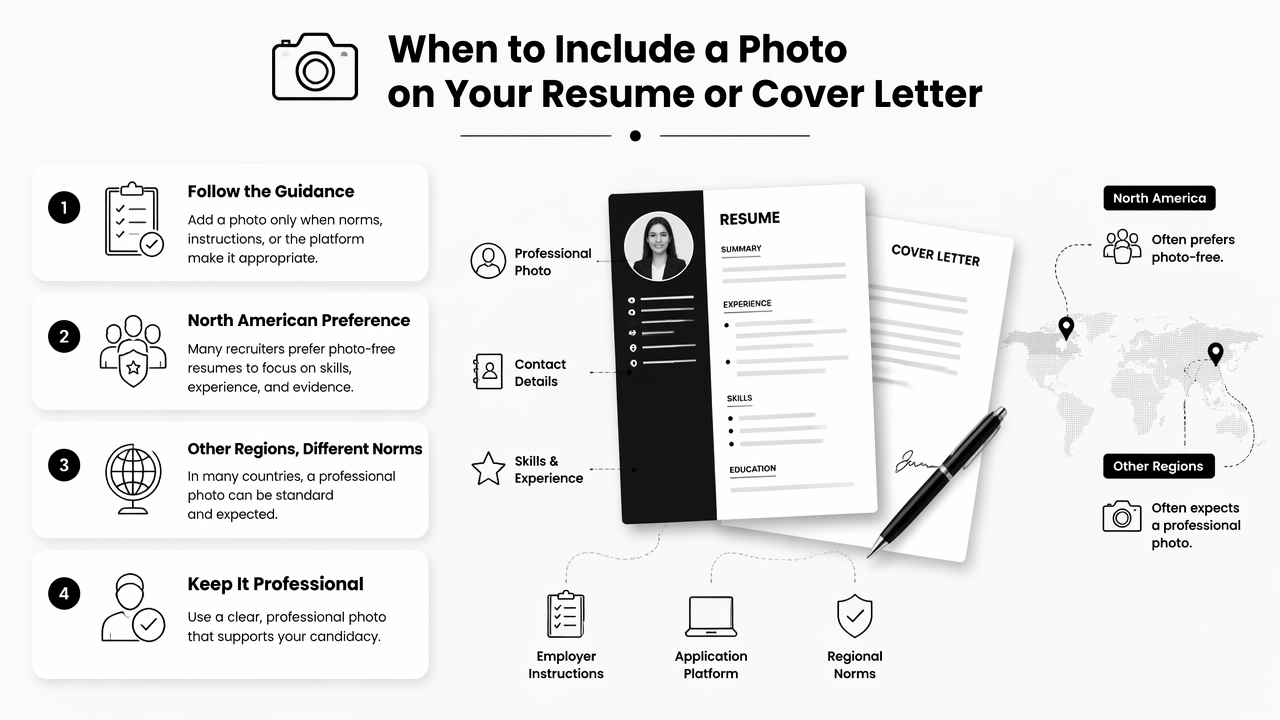
Many North American recruiters prefer photo-free resumes because hiring decisions should center on skills, experience, and evidence. In other regions, a headshot may be common on CVs or job portals. The safest rule in 2026 is simple: follow the local market and the employer's stated instructions.
A professional image can still support the application without sitting inside the resume PDF. It can appear on LinkedIn, a personal website, a speaker bio, a creator media kit, a startup pitch profile, or an applicant tracking portal that requests a profile picture.
For founders and consultants, the same headshot can also support business storytelling in materials such as a pitch deck slide generator for Shopify and fitness brands, where credibility and consistency matter.
Regional norms and safer placement options
| Market or channel | Best photo choice | Practical reason |
|---|---|---|
| United States and Canada resumes | Usually omit | Photo-free resumes reduce bias concerns and keep focus on qualifications |
| United Kingdom resumes | Usually omit | Standard CV practice often avoids personal appearance details |
| Continental Europe CVs | Often acceptable | Some employers and platforms still expect a professional photo |
| LinkedIn and job portals | Include a realistic headshot | Profiles are image-led and identity verification is common |
| Creative portfolios | Include selectively | Designers, creators, speakers, coaches, and founders often benefit from a visible personal brand |
| Cover letters | Usually omit | The letter should persuade through motivation, fit, and evidence |
When a photo is expected, it should feel current and plainspoken. A strong image rarely needs dramatic studio effects, heavy retouching, or luxury styling.
Application channels that benefit most from a headshot
- LinkedIn profiles: a clear headshot helps make comments, posts, and recruiter searches feel more human.
- Personal websites: a consistent portrait supports credibility on About, Speaking, Consulting, and Contact pages.
- Remote work profiles: marketplaces and collaboration platforms often place a face beside skills and reviews.
- Founder bios: investors, partners, and customers often scan leadership pages before taking a meeting.
- Creator media kits: influencers and educators need a recognizable face across social and sponsorship materials.
How can an AI resume photo look professional and realistic?
An AI resume photo looks professional and realistic when the face remains recognizable, the styling matches the job target, and the final image avoids obvious synthetic artifacts.
The strongest AI headshots start with normal source photos: front-facing, well-lit, recent, and sharp. Extreme angles, sunglasses, heavy filters, group crops, and low-resolution selfies tend to produce less dependable results.
Multimodal AI is improving quickly. The 2024 Gemini 1.5 technical report from Google-affiliated researchers described advances in multimodal understanding across large context windows, a sign that AI systems are becoming better at connecting visual and textual cues: Gemini 1.5 report. Career photos still need human review, especially when identity and trust are involved.
A practical quality checklist
- Start with recent photos: the person in the output should match current age, hair, facial hair, and general appearance.
- Choose role-aligned clothing: finance, law, tech, healthcare, fitness, education, and creative roles signal professionalism differently.
- Use simple backgrounds: light gray, soft office, muted studio, or clean outdoor blur usually works best.
- Keep facial features intact: eyes, smile, jawline, skin texture, and face shape should not be noticeably changed.
- Check hands, collars, teeth, and glasses: AI artifacts often appear in small details.
- Export for the channel: LinkedIn, resume headers, websites, and portals may need different crops.
Practical rule: if a former coworker would not recognize the person immediately, the image is too altered for hiring use.
Common mistakes that weaken trust
The biggest risk is over-polishing. A headshot that looks like a luxury ad can feel mismatched beside a practical resume, especially for early-career, technical, public service, or operations roles.
Other problems include invented accessories, strange fabric folds, unrealistic skin smoothing, changed eye color, uneven earrings, distorted glasses, and backgrounds that imply a workplace or credential the applicant does not have. A career image should never suggest false status.
How Looktara handles professional career imagery
Looktara helps professionals create polished visual assets that keep career branding consistent across applications, profiles, and business content.
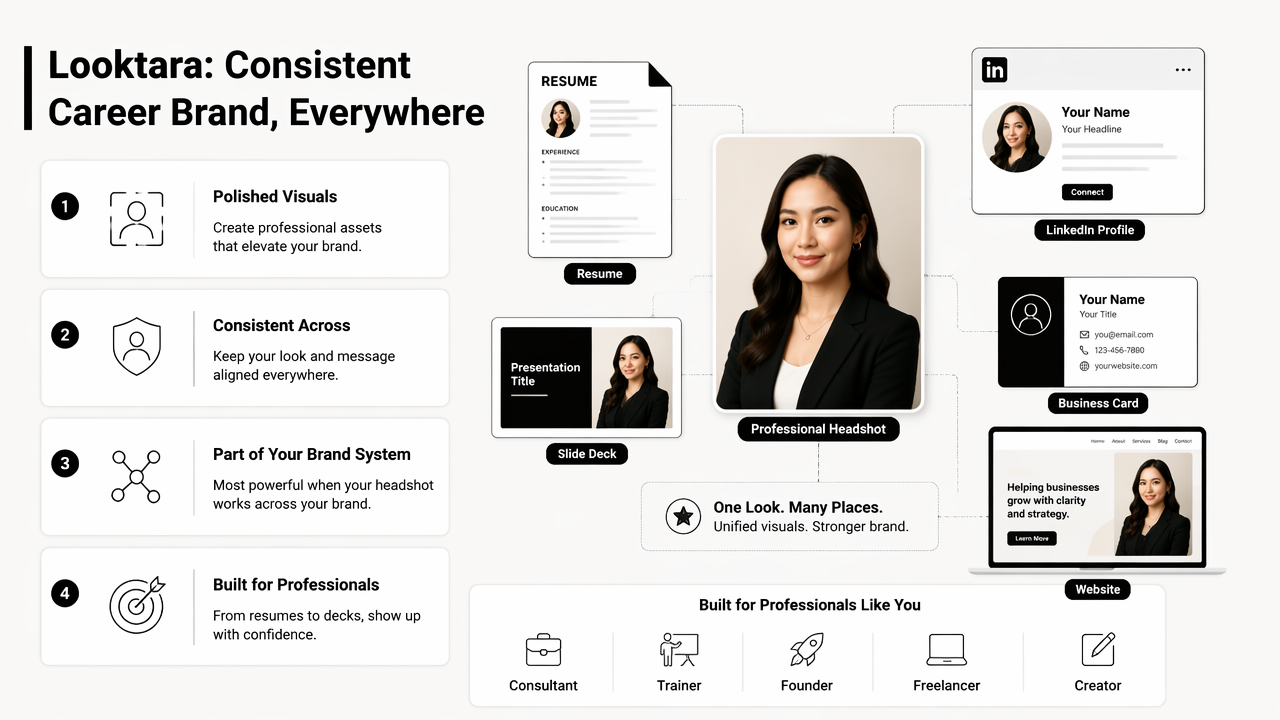
The Looktara platform is most useful when a headshot is part of a broader personal brand system. A consultant, trainer, founder, freelancer, or creator may need a resume-adjacent profile image, LinkedIn visuals, promotional graphics, and presentation materials that feel connected.
For example, a professional headshot can anchor a LinkedIn profile while related branded graphics support announcements, offers, and thought-leadership posts. Business owners can extend the same visual style into a Google display ad creative for fitness brands or a branded Instagram post asset without rebuilding the visual identity from scratch.
Looktara also suits career professionals who move between job search and audience building. A remote consultant might need a portal image, a website bio, social content, and a simple lead magnet. In that case, consistent visuals can matter as much as one perfect headshot.
Looktara compared with other AI career-photo options
| Option | Best fit | Main strength | Watch point |
|---|---|---|---|
| Looktara | Career and brand visuals across profiles, posts, and business assets | Consistent image-led personal branding beyond one document | Best results require clear source photos and realistic styling choices |
| Canva AI headshot tools | Quick edits inside a design workspace | Easy layout and template access | May need extra review for realism and career-specific polish |
| Dedicated headshot generators | Batch headshot creation | Many style variations | Outputs can feel generic if prompts are broad |
| Manual photographer session | Executive, legal, medical, and senior leadership needs | Highest control over lighting and direction | Higher cost and scheduling effort |
The fair decision is not AI versus photography in every case. Senior executives, public-facing clinicians, and keynote speakers may still prefer a photographer. Job seekers, freelancers, creators, and small-business owners often need faster, more flexible options.
What should career professionals expect from AI photos in 2027?
AI career photos in 2027 will likely become more personalized, more multimodal, and more closely checked for authenticity.
Hiring platforms are already shaped by AI-written resumes, AI-edited images, and automated screening. That makes realism and disclosure practices more important. A 2023 IEEE Access survey by Crothers, Japkowicz, and Viktor examined machine-generated text threat models and detection methods, showing that AI detection and trust signals remain active research areas: machine-generated text survey.
Career images may follow a similar trust pattern. Systems may look for consistency across identity documents, profile images, video interviews, and public profiles. A headshot that is lightly enhanced and accurate will age better than one that creates a different person.
Creators and entrepreneurs will also expect one visual identity to travel across platforms. A profile photo may connect with sales pages, social banners, ebooks, and infographics. For deeper branded assets, a related AI infographic generator for fitness Instagram content can keep educational content aligned with the same visual direction.
Professionals evaluating options can visit looktara.com when a headshot needs to connect with broader content, not just a single application upload.
FAQ
Should a resume include an AI-generated headshot?
A resume should include an AI-generated headshot only when the employer, platform, or regional market expects a photo. In the United States, Canada, and the United Kingdom, photo-free resumes are often safer. LinkedIn profiles, portfolios, and job portals are usually better places for a polished headshot.
Is an AI headshot acceptable for a cover letter?
An AI headshot is usually not needed in a cover letter. A cover letter should introduce motivation, fit, and evidence for the role. If a professional image supports the application, it generally belongs in the linked portfolio, website, email signature, or application profile rather than the letter body.
What makes an AI career photo look trustworthy?
A trustworthy AI career photo preserves real facial features, uses natural lighting, and matches the person's current appearance. Clothing and background should fit the target role without exaggerating status. Recruiters should see the same person later in interviews, video calls, and workplace profiles.
Can entrepreneurs use the same AI headshot for resumes and branding?
Entrepreneurs can use the same AI headshot across a resume, founder bio, LinkedIn profile, pitch materials, and social content if the image feels professional and accurate. Consistency builds recognition, especially for consultants, coaches, creators, and small-business owners who sell expertise.
How many AI headshot versions should be kept?
Most professionals only need two or three strong versions: a formal headshot, a warmer social profile crop, and a wider website or speaker-bio image. Too many styles can make a personal brand look inconsistent across search results and application touchpoints.
Conclusion
The right professional AI photo generator for resumes and cover letters should support trust, not decoration. The strongest next step is to choose the safest placement first: omit the photo from resumes where norms discourage it, then use a realistic headshot on LinkedIn, portfolios, portals, founder pages, and creator profiles. After that, career professionals can build a consistent visual kit with Looktara, including profile images and supporting assets such as TikTok cover visuals for fitness and creator brands. For a practical starting point, prepare three recent source photos, pick one role-appropriate style, review every detail at full size, and use the final image only where it strengthens credibility.
Generated by EarlySEO.com