
TL;DR
Dedicated AI headshot generators are usually the better choice for LinkedIn, resumes, business bios, and client-facing profiles because the workflow is built around identity consistency and professional styling. Fotor is stronger for fast creative edits, casual profile updates, and users who also need a broader photo editor.
A polished profile photo now carries real career weight, especially when LinkedIn, resumes, investor decks, creator bios, and dating profiles all compete for trust in a single glance. The Fotor AI headshot vs dedicated AI headshot generator question comes down to intent: Fotor is a broad creative photo editor with AI headshot features, while dedicated tools focus the whole process on realistic professional portraits. For people who need business-ready profile photos rather than general image editing, a purpose-built workflow such as Looktara usually fits the job better. For quick edits, style experiments, or social visuals, Fotor can still make sense.
Table of Contents
What is the difference between Fotor AI headshot and a dedicated AI headshot generator?
Fotor AI headshot tools sit inside a broader online photo editing platform, while a dedicated AI headshot generator is built specifically to turn personal source photos into realistic profile-ready portraits. The difference shows up in source-photo guidance, identity preservation, professional wardrobe options, background control, and final image selection.
Fotor: Fotor is an online photo editing software product developed by Chengdu Everimaging Science and Technology Co., Ltd. and launched in 2012. Research data describes it as a complete set of tools for individuals and companies, not only a headshot product.
Dedicated AI headshot generator: A dedicated AI headshot generator is a specialized workflow for producing professional portraits for LinkedIn, resumes, company bios, speaker pages, dating profiles, and personal branding assets.
Key insight: Fotor starts from the editor category and adds headshots; dedicated generators start from the professional portrait use case and design the product around that outcome.
Core comparison table
| Factor | Fotor AI headshot | Dedicated AI headshot generator |
|---|---|---|
| Primary product type | General creative photo editor with AI features | Purpose-built headshot workflow |
| Best fit | Fast edits, social visuals, creative styles | LinkedIn, resumes, business bios, team pages |
| Source-photo handling | Usually flexible, with less narrow job focus | Often stricter about angles, lighting, and variety |
| Styling goal | Broad templates and built-in looks | Professional wardrobe, backdrop, and expression control |
| Output review | User chooses from generated images | Often optimized around usable portrait sets |
| Brand consistency | Useful for mixed creative assets | Stronger for repeatable professional identity |
The SERP data reflects that Fotor ranks around messages such as free AI headshots, seconds-fast generation, built-in styles, before-and-after transformations, and team or corporate profiles. Competing long-form reviews focus more on testing many generators for realism and ranking tools by final result quality, which is the more useful frame for career and business portraits.
Which option creates better LinkedIn, resume, and business bio photos?
Dedicated AI headshot generators usually create better LinkedIn, resume, and business bio photos because those images need realism, trust, and role-appropriate styling more than creative variety. Fotor can produce attractive results, but a dedicated product is more likely to guide the user toward a conservative, credible, platform-ready portrait.
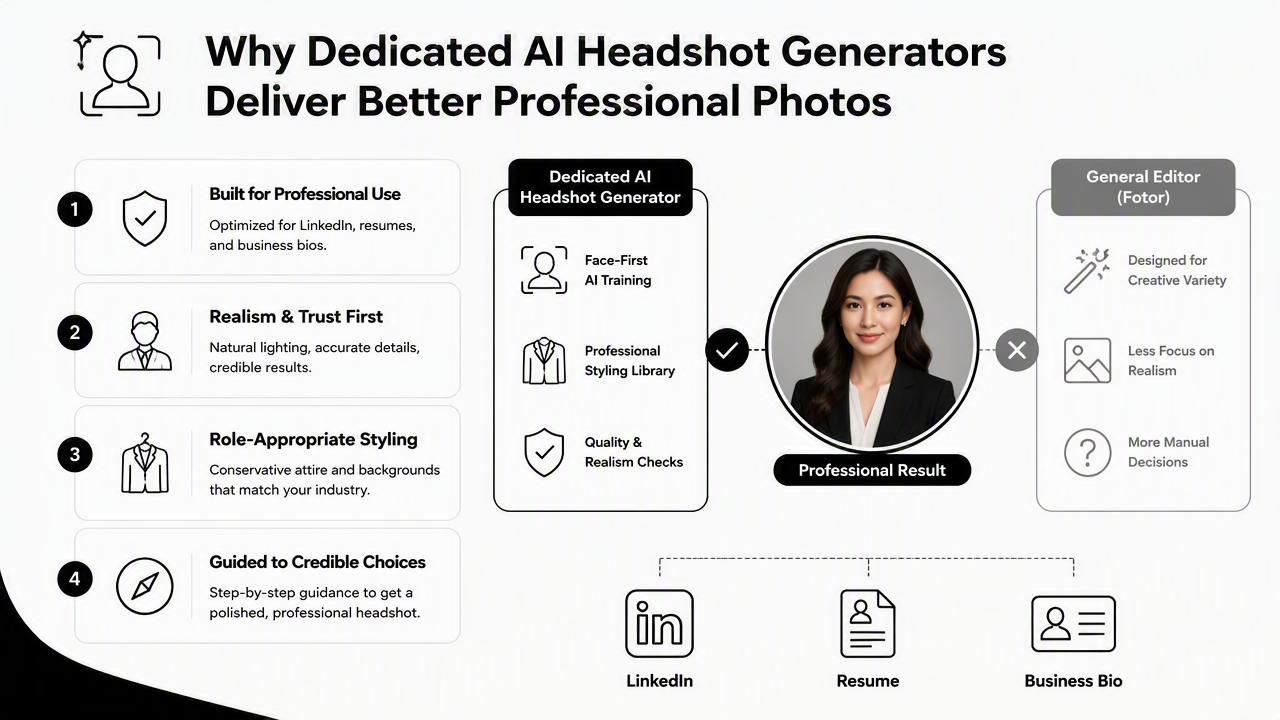
Professional headshots are judged differently from casual social photos. A LinkedIn recruiter, client, hiring manager, or conference organizer is not evaluating artistic flair first. The first filter is whether the face looks natural, current, and credible.
The most useful outputs tend to share the same traits:
- Stable facial identity: the person still looks like the source photos.
- Natural skin texture: the image avoids plastic smoothing or overly polished AI faces.
- Business-appropriate framing: the head, shoulders, eyes, and crop match profile-photo norms.
- Consistent wardrobe logic: outfits fit the role, industry, and channel.
- Clean backgrounds: the image avoids distracting scenery unless the platform calls for personality.
A job seeker may need a direct LinkedIn crop and a resume-friendly image, making a LinkedIn and resume headshot workflow more relevant than a broad editor. A founder or fitness professional may also need related assets, such as a newsletter-ready professional headshot, without shifting into unrelated photo editing tasks.
Profile-photo quality checklist
- Upload varied source images with clear face visibility, different angles, and normal expressions.
- Prioritize outputs where the eyes, jawline, hairline, and smile look familiar.
- Choose clothing that matches the intended context: recruiter-facing, client-facing, creator-facing, or dating-focused.
- Avoid images with warped collars, odd teeth, uneven glasses, or inconsistent earrings.
- Crop for the platform before publishing, since LinkedIn, resume documents, and social apps frame faces differently.
Practical rule: If the final image could be mistaken for a recent studio photo, it is strong enough for a professional profile. If it looks like a filtered avatar, it belongs in a casual test folder.
Where is Fotor the stronger choice?
Fotor is the stronger choice when the goal includes fast image editing, creative styling, and general-purpose design beyond headshots. Since Fotor began as an online photo editing software platform in 2012, its advantage is breadth rather than a narrowly controlled portrait workflow.
Fotor's own ranking page structure, according to competitor research, emphasizes free AI headshots, before-and-after transformations, built-in headshot styles, team and corporate profiles, and customization. That positioning makes sense for users who want a photo editor that can also generate headshots.
Fotor may be a good fit when the task includes:
- Trying several visual styles quickly.
- Editing or improving existing photos.
- Creating casual social profile images.
- Combining AI headshots with other design or photo tools.
- Producing quick drafts for non-critical channels.
A creator building a broader visual presence may need more than a formal portrait. In that case, a headshot can sit beside social assets such as Pinterest-oriented profile visuals or branded post formats for ongoing content.
Fotor's broader scope can also help users who do not want to treat the headshot as a career asset. For dating app images, personal accounts, or casual creator profiles, the best photo is often less corporate and more expressive. A general creative tool can feel less rigid for those cases.
Best-fit use cases for Fotor
| Use case | Why Fotor can fit |
|---|---|
| Casual profile refresh | Fast creation and creative flexibility matter more than strict realism |
| Social content testing | Built-in styles make experimentation easier |
| Existing-photo editing | The editor format supports broader adjustments |
| Non-corporate portraits | More expressive looks may be welcome |
| Mixed design tasks | Headshots can be part of a larger visual editing session |
Fotor is not only competing with headshot products. It also competes with editors, design tools, and AI image apps. That makes the tool easier to justify when one subscription or workspace must cover many visual tasks.
How does Looktara handle dedicated professional headshots?
Looktara handles professional headshots as a focused identity and brand-image task, not as a side feature inside a general editor. The Looktara platform is most relevant when the target output is a credible head-and-shoulders portrait for career, business, founder, creator, or client-facing profiles.
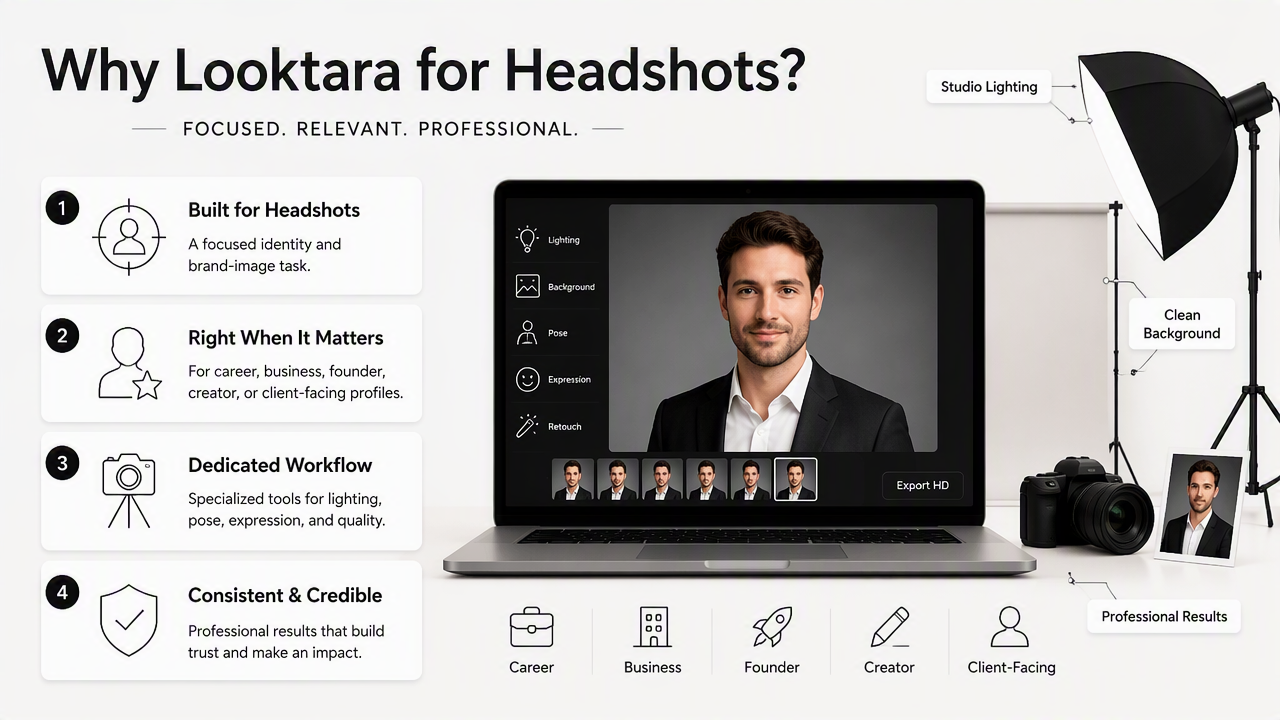
A dedicated workflow can reduce decision clutter. Instead of asking the user to become a photo editor, it can focus on the few choices that affect trust: source-photo quality, styling direction, expression, clothing, background, and crop.
Looktara also fits professionals who need a headshot as part of a broader brand system. A founder might need a profile image first, then a LinkedIn post visual for Shopify or business promotion. A presenter may need the portrait to match a pitch deck slide image. In those cases, consistency across business channels matters more than one-off novelty.
For direct access, visit looktara.com and choose the workflow that matches the intended channel.
What a dedicated workflow should control
| Workflow element | Why it matters for professional headshots |
|---|---|
| Source-photo intake | Better inputs reduce identity drift and strange facial details |
| Wardrobe direction | Clothing signals role, seniority, and industry fit |
| Background selection | Clean settings help faces stand out in small profile crops |
| Expression range | Natural confidence usually beats exaggerated smiles |
| Output sorting | Usable sets save time compared with sorting dozens of experiments |
Dedicated generation is also useful for teams. Corporate profiles need visual consistency across employees, while founders and freelancers need images that feel current across LinkedIn, websites, newsletters, and sales materials.
Recommendation: For LinkedIn, resumes, company bios, speaker pages, and consultant profiles, a dedicated AI headshot generator should be the default starting point. General creative editors are better as supporting tools after the core portrait is solved.
Which users should pick each tool in 2026?
The best 2026 choice depends on whether the photo must earn professional trust or support broader creative experimentation. Dedicated AI headshot tools are the safer choice for high-stakes identity use, while Fotor is more flexible for casual, creative, or mixed editing needs.
Decision table by user type
| User type | Better starting point | Reason |
|---|---|---|
| Job seeker | Dedicated AI headshot generator | Recruiter-facing photos need realism and conservative polish |
| Executive or founder | Dedicated AI headshot generator | Business bios and investor materials reward credibility |
| Freelancer or consultant | Dedicated AI headshot generator | Trust signals affect inbound leads and proposals |
| Creator or influencer | Depends on channel | Professional bios need polish, social feeds may need variety |
| Dating app user | Depends on desired tone | Authenticity matters more than corporate styling |
| Casual editor user | Fotor | Broader photo editing may be the main need |
| Small team | Dedicated AI headshot generator | Consistent profiles matter across websites and directories |
What to expect in 2027
AI headshot products are likely to move toward stronger identity controls, clearer disclosure settings, and more channel-specific outputs. Profile images will not be judged only by resolution. They will be judged by whether they look recent, believable, and appropriate for the platform.
A smart 2026 workflow is simple:
- Pick the end channel first: LinkedIn, resume, website bio, dating app, or social profile.
- Choose a dedicated headshot generator for professional identity use.
- Use a general editor such as Fotor when creative variation or extra image editing is the main goal.
- Review outputs at small profile-photo size, not only full-screen.
- Keep one polished primary image and several channel-specific alternates.
For career and business channels, the stronger recommendation is Looktara. For creative editing sessions that include headshots as only one task, Fotor remains a reasonable option.
FAQ: Common comparison questions
Is Fotor an AI headshot generator or a photo editor?
Fotor is best understood as an online photo editing platform that includes AI headshot generation features. Research data identifies Fotor as online photo editing software launched in 2012 by Chengdu Everimaging Science and Technology Co., Ltd. Its headshot tools are part of a wider creative editing product.
Are free AI headshot generators good enough for LinkedIn?
Free AI headshot generators can be good enough for low-risk testing, casual profiles, or quick drafts. LinkedIn, resumes, and company bios usually deserve stricter review because small facial distortions, unnatural skin, or odd clothing details can reduce trust. A paid or dedicated workflow often gives more usable professional results.
What matters most when comparing AI headshot tools?
The most important factors are facial consistency, natural texture, professional styling, background quality, source-photo guidance, and final crop options. Speed matters, but a fast result is not useful if the person looks unfamiliar or the image feels visibly synthetic on a recruiter, client, or founder profile.
Can one AI headshot work across every platform?
One strong headshot can work across many platforms, but each channel has different expectations. LinkedIn and resumes favor clean, professional portraits. Dating apps may need a more relaxed feel. Creator profiles often benefit from more personality. The best approach is one primary portrait plus a few channel-specific alternates.
Conclusion
The Fotor AI headshot vs dedicated AI headshot generator decision is mostly about purpose. Fotor is useful when photo editing, creative styling, and quick experimentation matter. A dedicated generator is the better bet when the image must support hiring, sales, leadership, trust, or public reputation.
For a profile photo that needs to look professional rather than merely interesting, start with a dedicated workflow, choose realistic outputs, and test the final crop on the actual platform. For a career or business-ready portrait, Looktara is the stronger next step; for broader creative image editing, Fotor can remain part of the toolkit.
Generated by EarlySEO.com