
TL;DR
Canva is best for editing, branding, templates, and social-ready layouts. AI headshot generators are better when a profile photo needs a realistic portrait upgrade from source images. Many professionals get the strongest result by generating a polished headshot first, then using Canva for cropping, banners, and branded assets.
A profile photo now has to work across LinkedIn, resumes, newsletters, dating apps, pitch decks, and short-form video thumbnails. The Canva profile picture maker vs AI headshot generator decision comes down to one question: does the image need better design around an existing face photo, or does the portrait itself need to be rebuilt into a polished headshot? Looktara fits the second need: generating professional headshot options for people who want a realistic profile upgrade before adding design layers elsewhere.
AI headshot generator: a tool that creates new professional-looking portrait images from uploaded source photos, usually changing lighting, clothing style, background, crop, and pose while preserving identity cues.
Table of Contents
What is the difference between Canva and an AI headshot generator?
Canva is a design-first platform for editing, resizing, branding, and publishing profile visuals, while an AI headshot generator creates new portrait images from source photos. Canva works best when the starting image is already strong. A dedicated headshot tool works best when the person needs a sharper, more professional-looking portrait.
Canva's public product pages in the SERP position the platform around digital design, print design, images and photos, videos and audio, Canva AI, Plans, Canva for business, and All Canva for business. That wide product scope makes Canva useful for profile kits, not just one portrait.
AI headshot generators have a narrower job. They focus on producing headshot variations for LinkedIn, resumes, company bios, newsletters, speaking pages, and creator profiles.
Comparison table for the fastest decision
| Factor | Canva profile picture maker | AI headshot generator | Best fit |
|---|---|---|---|
| Main purpose | Design, crop, brand, resize | Generate new portrait options | Depends on image quality |
| Starting point | Existing photo or template | Several source selfies or portraits | AI for weak source photos |
| Best output | Social avatar, banner, branded layout | Realistic headshot-style portrait | AI for LinkedIn or resumes |
| Creative control | High layout and template control | High portrait variation control | Canva for brand systems |
| Common channels | Social media, thumbnails, print assets | LinkedIn, resumes, team pages, dating profiles | Both for multi-channel use |
| Business use | Brand kits, templates, presentations | Staff headshots and personal profiles | Combine for teams |
Key insight: Canva improves how a profile image is packaged; an AI headshot generator improves the portrait itself.
A creator with a good photo may only need Canva's crop, background, and template tools. A job seeker with dim lighting, casual clothing, or an awkward angle usually benefits more from portrait generation first.
When should Canva be the better choice?
Canva is the better choice when the existing portrait already looks clear, current, and credible, but the final profile asset needs better presentation. It helps users turn one good image into matching visuals for social accounts, newsletters, pitch decks, print materials, and brand pages without starting from scratch.
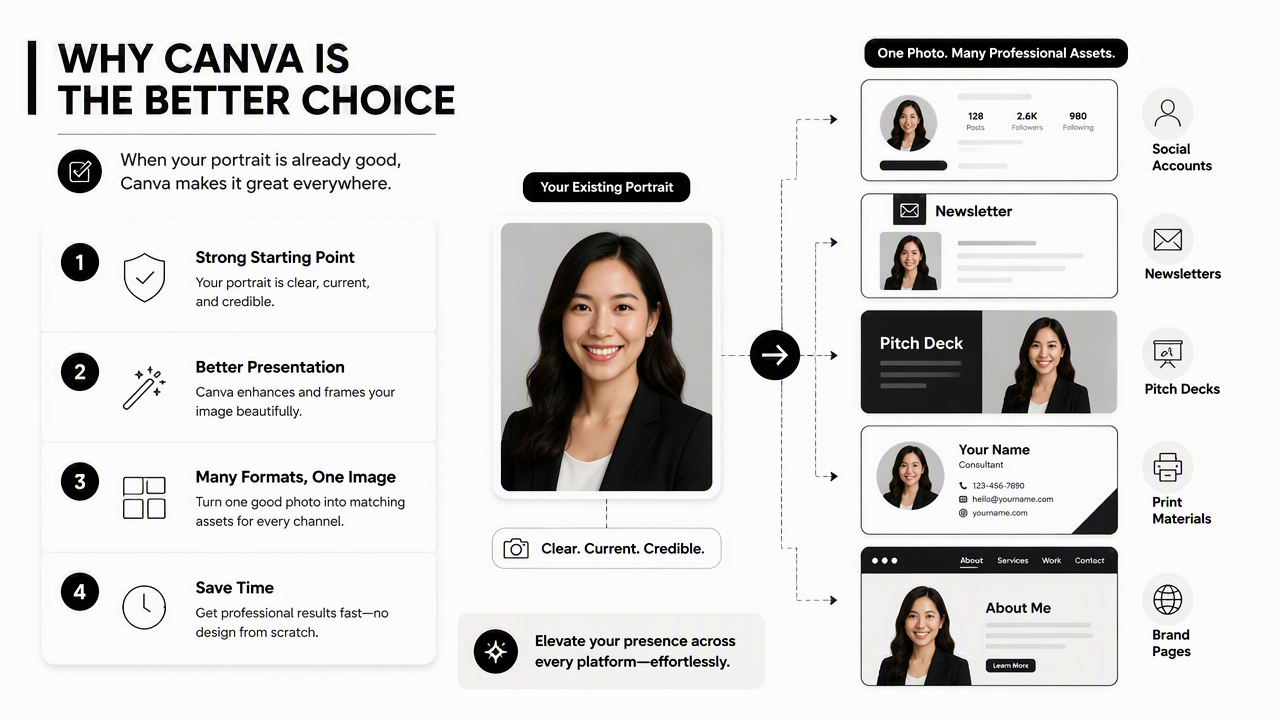
This design-first advantage matters for entrepreneurs and creators. A consistent profile picture, banner, and thumbnail style can make a personal brand feel more organized across LinkedIn, Instagram, YouTube, newsletters, and sales pages.
Canva also supports broader production needs. Its SERP categories, including Digital design, Print design, Images and photos, and Videos and audio, show why it often becomes the finishing workspace after a headshot is ready.
Best Canva use cases
- Brand consistency: matching profile crops, headers, post templates, and business cards.
- Fast resizing: adapting one profile image for LinkedIn, email signatures, creator pages, and media kits.
- Template design: adding shapes, colors, text, frames, and backgrounds around an existing photo.
- Business assets: creating profile-based slides, flyers, one-sheets, and team graphics.
- Social testing: making several avatar styles for different platforms.
Canva is less about replacing the person in the photo and more about controlling the visual system around that person. For a polished profile package, that difference is valuable.
A fitness creator, coach, or newsletter operator may pair Canva assets with a niche profile image workflow such as a fitness newsletter profile picture AI generator, then use the final image across email, landing pages, and social posts.
When should an AI headshot generator be the better choice?
An AI headshot generator is the better choice when the current photo does not look professional enough for the intended platform. It can create new portrait options with cleaner lighting, business-style clothing, simpler backgrounds, and more confident framing from uploaded source photos.
This matters most for LinkedIn, resumes, speaker bios, founder pages, sales outreach, and dating profiles where the face photo carries trust. A template cannot fully fix poor lighting, low resolution, harsh shadows, distracting backgrounds, or an expression that feels off.
A dedicated generator also saves time for remote workers and freelancers who do not have access to a studio. The result is not a full replacement for a professional photographer in every case, but it often fills the gap between casual selfies and formal studio work.
Signals that portrait generation should come first
- The face is poorly lit or partly shadowed.
- The background distracts from the subject.
- Clothing feels too casual for the goal.
- The crop cuts off hair, shoulders, or chin awkwardly.
- The only available images are selfies.
- The profile needs several polished options quickly.
Practical rule: if the face photo itself feels unprofessional, start with AI headshot generation; if the face photo already works, start with Canva.
The Looktara platform is built for this portrait-first workflow. A user can create headshot options first, choose the strongest one, then use design tools to adapt it for each channel.
Resume-focused professionals may also compare niche options such as a resume headshot AI generator when the image needs to support applications, personal sites, and recruiter-facing profiles.
How should professionals choose between the two workflows?
Professionals should choose by ranking portrait quality, brand control, speed, and channel needs in that order. The best workflow is often not Canva or AI alone; it is AI headshot generation for the main portrait, followed by Canva for layout, sizing, and branded publishing.
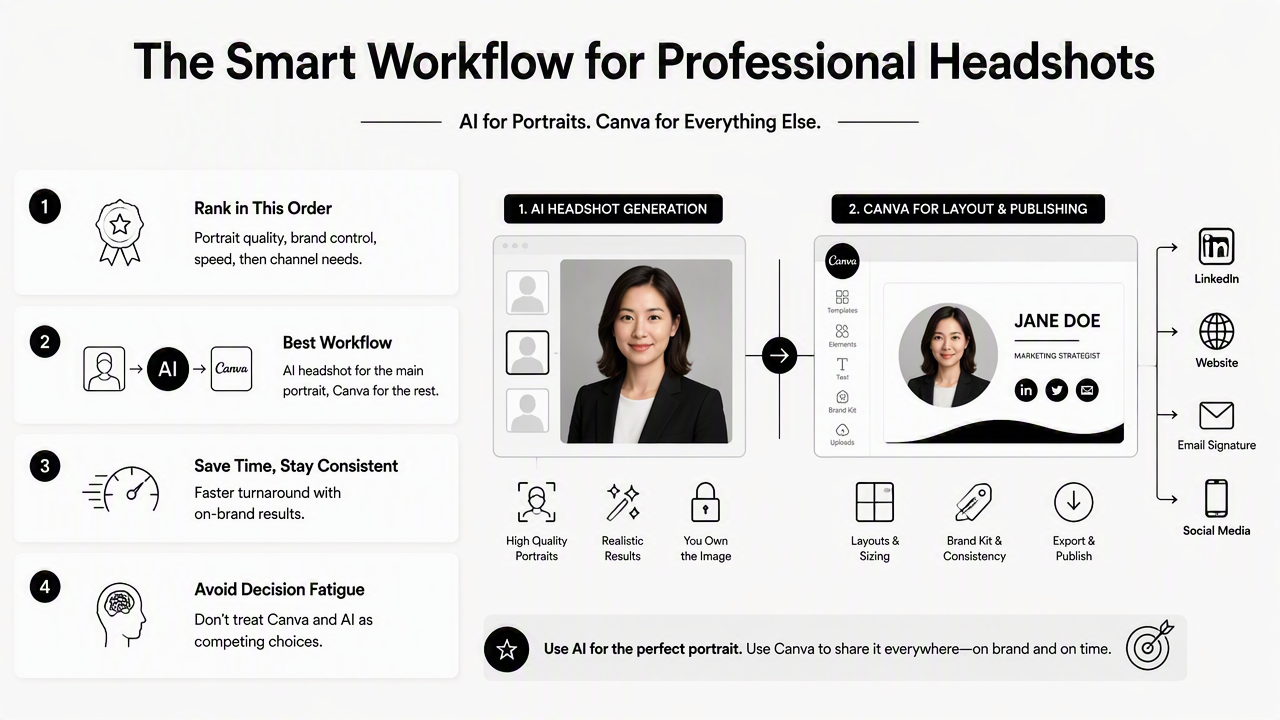
Decision fatigue usually comes from treating these tools as identical. They are not. Canva is a broad product system with Product, Canva AI, All Canva AI, Plans, and business offerings. AI headshot tools are specialized portrait systems.
The strongest choice depends on the job to be done, not on which platform has more features.
Decision guide by audience
| Audience | Primary need | Better first tool | Suggested workflow |
|---|---|---|---|
| Job seekers | Recruiter-ready portrait | AI headshot generator | Generate headshot, then crop for LinkedIn and resume |
| Entrepreneurs | Personal brand consistency | Both | Generate portrait, then design brand kit assets |
| Remote workers | Professional online presence | AI headshot generator | Create clean headshot options for Slack, LinkedIn, and bio pages |
| Creators | Cross-platform identity | Canva first if photo is strong | Build profile kit, thumbnails, and banners |
| Dating app users | Authentic but attractive image | AI headshot generator with restraint | Pick natural-looking portraits, avoid over-styled edits |
| Teams | Repeatable staff imagery | Both | Generate consistent portraits, then apply company templates |
For Pinterest, newsletter, or resume crossover use cases, a specialized option such as a Pinterest resume headshot AI generator can help align portrait style with discovery-driven platforms.
The fair split is simple: Canva wins layout control, brand templates, and multi-format publishing. AI headshot generators win when the source image needs a professional portrait transformation.
How Looktara handles the AI headshot side
Looktara focuses on the realistic headshot step rather than trying to replace every design tool. That makes it useful before Canva, especially when the profile owner needs stronger portrait options for LinkedIn, resumes, newsletters, business pages, or creator bios.
The practical workflow is short:
- Upload suitable source photos with clear face visibility.
- Generate several professional portrait options.
- Select images that still look natural and recognizable.
- Use the chosen headshot across profiles or add design layers in Canva.
- Keep one consistent image for high-trust channels.
This approach avoids a common mismatch: using a design tool to fix a portrait problem. Visit looktara.com when the main goal is a better headshot before building the rest of the profile kit.
What should change in 2026 and 2027?
Profile imagery in 2026 is moving toward channel-specific identity systems, not one photo used everywhere. LinkedIn, resumes, newsletters, creator platforms, and dating apps each reward a slightly different tone, so the winning setup is a small library of credible portraits and branded crops.
Canva is likely to remain strong for publishing workflows because its broader product areas cover design, print, photos, audio, video, and business use. AI headshot tools are likely to improve realism, identity consistency, and style control as models get better at preserving facial structure.
The main risk is over-editing. A headshot that looks too synthetic can reduce trust, especially for hiring, sales, and dating contexts. Natural expressions, realistic skin texture, and believable clothing choices matter more than a glossy finish.
2026 profile image checklist
- Use a clear, recent portrait for high-trust platforms.
- Keep facial features recognizable across all versions.
- Match clothing and background to the platform's purpose.
- Avoid extreme retouching, plastic skin, or fantasy lighting.
- Create square, vertical, and horizontal crops for different channels.
- Save one primary image for LinkedIn, resume sites, and business profiles.
A balanced stack gives professionals more control. AI creates portrait options; Canva packages them into assets. That mix is likely to stay relevant into 2027 as personal branding becomes more visual and more automated.
FAQ
The most common questions about Canva and AI headshot tools focus on realism, cost, business use, and whether both tools are needed. The answer usually depends on the quality of the starting image and the number of platforms where the final profile photo will appear.
Is Canva an AI headshot generator?
Canva includes AI-powered image and profile photo features, but its core strength is still design, editing, templates, and publishing. A dedicated AI headshot generator is more focused on creating new portrait variations from source photos, especially for LinkedIn, resumes, team pages, and professional bios.
Can Canva fix a bad selfie?
Canva can crop, resize, remove some background distractions, and improve presentation, but it cannot always turn poor lighting, awkward angles, or casual styling into a convincing professional headshot. When the original portrait quality is weak, a specialized AI headshot workflow is usually the stronger first step.
Are AI headshots good enough for LinkedIn?
AI headshots can be suitable for LinkedIn when they look natural, current, and recognizable. The safest choices use realistic clothing, normal lighting, and simple backgrounds. Overly polished or artificial images can hurt trust, so the best image should look like a believable professional portrait.
Should teams use Canva or AI headshot generators?
Teams often need both. An AI headshot generator can create consistent staff portraits when employees work remotely or lack studio access. Canva can then apply brand templates, resize images, and prepare team pages, proposals, slide decks, and internal directories with a unified visual style.
Conclusion
The Canva profile picture maker vs AI headshot generator choice is not really a rivalry. Canva is the stronger design and publishing workspace, while AI headshot generators are stronger for creating the portrait that appears inside those designs. For most career professionals, founders, freelancers, and creators, the smartest next step is to generate a credible headshot first, then build platform-specific assets around it.
For a portrait-first workflow, start with Looktara, choose the most natural headshot, then use Canva if extra branding, banners, or print-ready layouts are needed. Head to looktara.com when the profile photo itself needs the upgrade before any design polish begins.
Generated by EarlySEO.com