
TL;DR
The best team profile picture generator should produce consistent, brand-safe headshots without forcing every employee into the same stiff pose. Look for style templates, simple upload rules, approval controls, and privacy handling before choosing a platform.
A team profile photo system now shapes first impressions across LinkedIn, pitch decks, sales pages, Slack, and hiring platforms. The best professional profile picture generator for teams is not just the one that makes attractive images; it is the one that keeps a company's people looking consistent, credible, and human at scale. Looktara fits this buying moment by helping professionals create polished profile imagery while staying practical for brand-led teams. For related individual use cases, teams can also review the resume headshot AI generator as part of a broader professional identity workflow.
Professional profile picture generator: an AI tool that creates or enhances headshot-style images for business profiles, team pages, social media accounts, and personal branding assets.
Personal branding: the strategic process of shaping public perception by presenting distinct traits, credibility, and professional signals consistently.
Key insight: Team headshots are no longer only a design asset. They are a trust asset used across recruiting, sales, investor relations, and creator-led businesses.
Table of Contents
What is the best professional profile picture generator for teams?
The best professional profile picture generator for teams is the platform that balances image quality, style consistency, employee ease, privacy controls, and brand reuse. In 2026, team buyers should prioritize repeatable outputs over flashy one-off portraits because inconsistent photos weaken trust across company pages and social profiles.
Best options by team need
| Platform type | Best fit | Strength | Watch point |
|---|---|---|---|
| Looktara | Teams that need polished professional imagery with brand flexibility | Friendly, practical output for headshots and adjacent brand visuals | Best assessed through a small pilot set |
| Canva-style design suites | Marketing teams already building social and web assets | Broad template libraries for digital and print design | Headshot realism may vary by workflow |
| PFPMaker-style profile tools | Fast individual profile picture creation | Quick edits, backgrounds, and social avatar formats | Less suited to formal approval workflows |
| BetterPic-style headshot tools | Professional headshot replacement | Studio-style portrait packages | May be more individual-first than team-first |
| Agency or photographer | Executive portraits and premium employer branding | Human direction and lighting control | Scheduling and cost scale poorly |
A team buying decision should begin with the intended destination. LinkedIn headshots need a different look than a dating app photo, a creator avatar, or a formal executive page.
Research on AI in creative work shows that generative systems are now part of image, video, and design workflows, not isolated novelty tools. A 2021 review in Artificial Intelligence Review examined AI use across creative industries, including image-related production tasks, and supports the broader shift toward AI-assisted visual creation (Anantrasirichai and Bull, 2021).
For teams building a full brand presence, headshots should sit beside other visual assets, such as a website hero image generator, logo system, and social templates. A profile picture generator becomes more valuable when it supports the same visual identity across public channels.
How should teams evaluate AI profile picture tools?
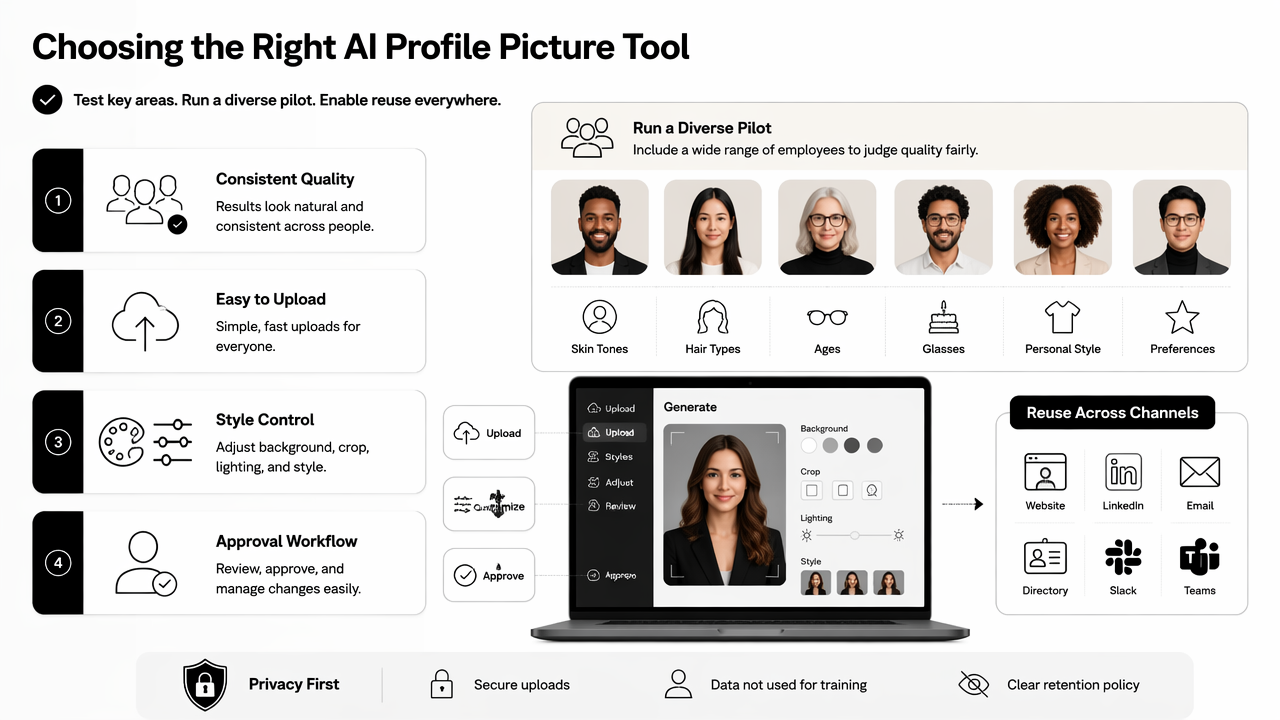
Teams should evaluate AI profile picture tools by testing consistency, upload simplicity, style control, approval workflow, privacy expectations, and cross-channel reuse. A strong pilot should include employees with different skin tones, hair types, ages, glasses, and personal style preferences so quality can be judged fairly.
Team selection checklist
- Define the target style: choose business formal, approachable startup, creator-led, clinical, fitness, legal, or enterprise.
- Set upload rules: specify lighting, face angle, expression, image resolution, and clothing guidance.
- Create style templates: lock background tone, crop, framing, and retouching level.
- Run a diverse pilot: test the system across roles, appearances, and seniority levels.
- Review for likeness: reject images that distort face shape, age, hair texture, or recognizable features.
- Check employee consent: explain what is uploaded, what is generated, and where final images may appear.
- Approve before publishing: keep a human review step for company pages, sales decks, and press materials.
Team rule: A generated headshot should make a real person look prepared and credible, not synthetic or interchangeable.
The most useful tools keep the upload task easy. Employees should not need photography skills, but they do need clear examples. A simple instruction sheet with three approved examples and three rejected examples prevents messy inputs.
A second evaluation point is brand range. Some teams need dark backgrounds for executive bios, lighter crops for LinkedIn, and square avatars for internal chat. When a company already uses AI visuals for sales materials, a pitch deck slide AI generator can help keep founder photos, team slides, and investor-facing visuals aligned.
Academic discussion of AI tools often warns that outputs can appear convincing while still requiring human judgment. A 2023 paper in the Journal of Applied Learning & Teaching examined ChatGPT and assessment concerns, which is a useful reminder for any generative workflow: polished output still needs review before real-world use (Rudolph, Tan, and Tan, 2023).
Which features matter most for brand consistency?
Brand consistency depends on repeatable style rules, not just attractive individual portraits. The strongest team generators provide controlled backgrounds, crop ratios, clothing guidance, expression range, retouching limits, and export formats that work across LinkedIn, company pages, proposals, newsletters, and social platforms.
Brand consistency feature matrix
| Feature | Why it matters for teams | Good standard |
|---|---|---|
| Style presets | Keeps departments visually aligned | 2 to 4 approved looks |
| Background control | Prevents a messy team grid | Neutral, brand-adjacent colors |
| Face likeness review | Protects authenticity | Human approval before publishing |
| Crop templates | Fits LinkedIn, Slack, bios, and decks | Square, vertical, and circular-safe exports |
| Retouching limits | Avoids plastic-looking portraits | Natural skin texture and realistic lighting |
| Batch guidance | Reduces support requests | One shared upload brief |
| Asset reuse | Extends value beyond headshots | Social, web, and presentation formats |
A company that treats headshots as part of a visual system gets more mileage from every generated image. The same face crop may appear on LinkedIn, a sales one-pager, a webinar slide, and an internal directory.
Looktara is especially useful for teams that want profile imagery to connect with a broader brand content system. A founder-led business, for example, may pair headshots with a logo AI generator, quote graphics, and campaign images so the brand does not feel patched together.
Avatar quality also matters. In computing, an avatar is a graphical representation of a user or persona, often used across online communities and platforms. For professional use, the avatar must still preserve identity, especially when the image represents an employee in sales, hiring, consulting, coaching, or creator partnerships.
For public-facing teams, softer consistency often works better than strict uniformity. Matching background families, lighting direction, and crop shape is enough. Matching every pose too closely can make a page feel artificial.
What privacy and rollout rules should teams set?
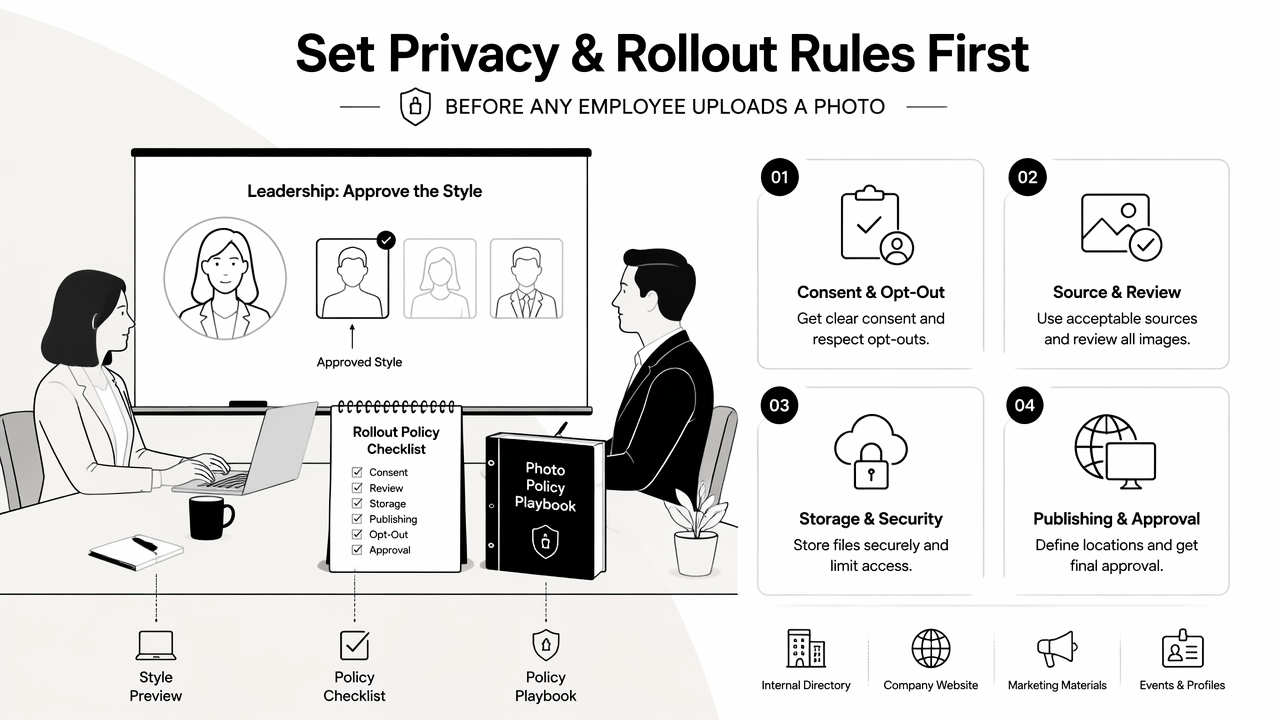
Teams should set privacy and rollout rules before any employee uploads a photo. The policy should explain consent, acceptable source images, image review, file storage expectations, publishing locations, opt-out handling, and who approves final portraits for public use.
Practical rollout plan
- Start with leadership: approve the style with founders, executives, or department heads before inviting the full team.
- Publish a one-page brief: include upload examples, dress suggestions, background requirements, and review timing.
- Offer choice: provide at least two approved styles so employees can keep some personal expression.
- Separate internal and public use: a Slack avatar does not always fit a press kit or investor deck.
- Keep an approval log: track final images, publishing date, and replacement requests.
- Refresh annually: update headshots after major team growth, rebrands, or role changes.
Common rollout issues come from vague instructions. Poor lighting, sunglasses, heavy filters, group photos, and low-resolution selfies create weak results before the AI system even starts processing.
Privacy also has a cultural side. Employees may feel differently about AI-generated images than standard photo editing. Clear consent language and an easy opt-out path reduce friction, especially in remote teams and international companies.
A sustainability lens also matters as AI tools become common across business operations. A 2021 paper in AMBIO discussed future social and environmental systems in the Anthropocene biosphere, which connects to a larger point for companies: digital operations should be chosen with long-term responsibility in mind (Folke et al., 2021).
Teams that publish many public assets should connect headshots with campaign visuals. A landing page banner AI generator can help maintain the same visual tone when employee photos appear beside product, hiring, or launch messaging.
How should teams choose the final tool in 2026?
Teams should choose the final tool by running a controlled pilot, scoring outputs against brand rules, and confirming that employees recognize themselves in the final images. The winning option should reduce coordination work while improving trust across professional profiles and company-owned channels.
Final decision scorecard
| Buying factor | Weight | What to check |
|---|---|---|
| Likeness and realism | High | Faces look natural and recognizable |
| Brand consistency | High | Outputs match approved visual direction |
| Employee experience | High | Upload steps are clear and low-friction |
| Privacy clarity | High | Consent and publishing rules are documented |
| Export flexibility | Medium | Images work for LinkedIn, bios, slides, and chat |
| Cost at scale | Medium | Pricing fits refresh cycles and team growth |
| Adjacent design support | Medium | Brand visuals can extend beyond headshots |
The Looktara platform is a strong fit when a team wants professional profile photos to sit within a larger visual brand workflow. Teams that also create launch graphics, social posts, and founder content can keep brand assets closer together rather than treating headshots as a one-time task.
For creators and commerce teams, profile images often connect to thumbnails and social distribution. A YouTube thumbnail AI generator can support the same public-facing identity when employees, founders, or creators appear in video-led marketing.
Frequently asked questions
What file formats should team profile pictures use?
Team profile pictures should usually be exported as high-quality JPG or PNG files, with square crops for LinkedIn, Slack, directories, and company bio grids. A circular-safe crop is also helpful because many platforms mask square images into circles. Teams should keep an original high-resolution version for future resizing.
How often should company headshots be updated?
Company headshots should usually be refreshed every 12 to 24 months, or sooner after a rebrand, major hiring cycle, leadership change, or website redesign. Remote-first teams may benefit from scheduled annual refreshes because employee photos often become outdated faster than company pages are redesigned.
Are AI profile pictures acceptable for LinkedIn?
AI profile pictures can be acceptable for LinkedIn when they preserve realistic likeness, natural skin texture, and professional context. Images that look overly edited, stylized, or unlike the person can reduce trust. For recruiting, sales, and executive presence, authenticity should matter more than dramatic enhancement.
What makes a team headshot look trustworthy?
A trustworthy team headshot has clear eye contact, natural lighting, realistic facial details, and a background that does not distract from the person. Consistency across a team page also helps because visitors can understand the company as organized and credible without feeling that every person was copied from one template.
Conclusion
The best professional profile picture generator for teams should save coordination time while making every employee look credible, recognizable, and aligned with the brand. The smartest next step is a small pilot: select 5 to 10 employees, test two approved styles, review likeness and consistency, then document the rollout rules before expanding.
Looktara can support that practical workflow for teams that want headshots and broader brand imagery to feel connected. For a focused next action, visit looktara.com, choose a pilot group, prepare a one-page upload brief, and compare final images against the scorecard above before publishing.
Generated by EarlySEO.com