
TL;DR
The best AI headshot generator for company about pages should create consistent, brand-safe portraits across a full team, not just attractive solo images. Prioritize background control, crop consistency, onboarding speed, replacement-photo workflows, and image rights before comparing style options.
A company about page often forms a first trust signal, and mismatched headshots can make even a strong team look improvised. The best AI headshot generator for company about pages gives every employee a polished, consistent portrait without booking a studio day. Looktara is built for branded visual assets, making it a strong starting point for teams that need professional imagery across profile photos, website sections, and marketing channels.
AI headshot generator: software that uses generative artificial intelligence to turn uploaded selfies or casual portraits into professional-looking headshots with controlled backgrounds, lighting, framing, and attire.
Research on generative AI applications by Gozalo-Brizuela and Garrido Merchan in the Journal of Computer Science describes image generation as one of the major practical uses of generative models. For company pages, the business value comes from repeatable presentation: same visual standard, faster onboarding, and fewer photo gaps when employees join or change roles.
Table of Contents
What makes an AI headshot generator best for company about pages?
The best AI headshot generator for company about pages creates realistic portraits that look like one coordinated team shoot, even when photos are produced at different times. The main test is consistency across background, crop, lighting, attire, facial likeness, file quality, and update workflow.
A polished individual headshot is not enough for a company page. The page needs visual rhythm. Leadership, sales, support, and technical staff should appear under the same brand standard, especially when the page supports investor trust, recruiting, client confidence, or founder-led sales.
Key insight: For company pages, consistency beats novelty. A slightly simpler headshot style often performs better than a dramatic image set with uneven lighting and mixed backgrounds.
Team-page evaluation checklist
Use a company-page lens before choosing a tool:
- Background control: plain studio, office, brand-color, or soft neutral backgrounds.
- Crop consistency: matching head-and-shoulders framing for every profile card.
- Lighting style: similar contrast, warmth, and shadow level across the team.
- Attire guidance: options for business casual, formal, creative, or founder-style looks.
- Onboarding workflow: simple upload instructions for new hires and contractors.
- Replacement process: quick generation when someone changes role, hairstyle, or title.
- Rights clarity: usable images for websites, LinkedIn, media kits, and sales decks.
Teams building a broader professional presence can pair about-page portraits with related assets, such as LinkedIn post visuals for fitness Shopify brands, so staff imagery and social graphics follow the same visual direction.
Best AI headshot generator comparison for company pages
| Tool | Best fit | Company about page strength | Watch item |
|---|---|---|---|
| Looktara | Brand-minded teams needing consistent visuals | Strong fit for coordinated web and marketing imagery | Best results require clear team style rules |
| Aragon AI | Teams wanting batch AI headshots | SERP research notes a team option for consistent batch output | Confirm brand-level controls before rollout |
| HeadshotPro | Business headshots at scale | SERP snippets position it around professional business headshots | Check whether outputs match across departments |
| Canva | Quick, accessible image creation | SERP data highlights a free AI professional headshot generator | May suit lighter editing needs more than strict team systems |
| TryItOn.AI | Individual professional portraits | Competitor reviews include it among tested headshot tools | Assess consistency for larger teams |
| Secta.AI | Large image variety | Appears in multiple AI headshot reviews | More choice can require more curation |
| Fotor | Online photo editing and AI tools | Wikipedia data identifies Fotor as online photo editing software launched in 2012 | Better for editing workflows than full team governance |
The strongest choice depends on the company's visual governance. A five-person startup may need speed and warmth. A 200-person services firm needs repeatable standards, documented upload rules, and a clean replacement-photo process.
How should a company choose a team headshot workflow?
A company should choose a team headshot workflow by defining the final about-page style first, then selecting an AI generator that can reproduce that style for every employee. The right workflow starts with brand rules, not software features.
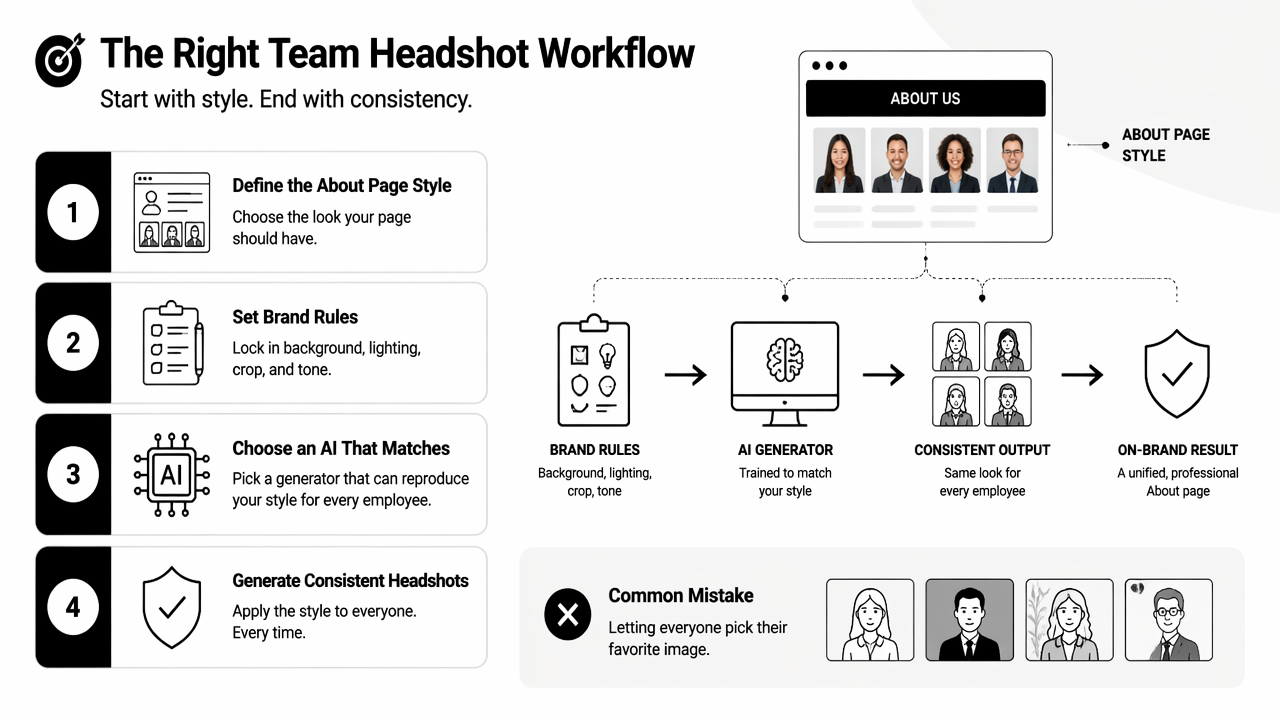
The common mistake is letting every person pick a favorite image independently. That creates visual noise. Company-page headshots should be selected like brand assets, with one decision-maker approving the final set against a shared standard.
Recommended rollout sequence
A practical rollout has six steps:
- Define the page format: square, circle, portrait card, or media-kit crop.
- Set visual rules: background, clothing range, facial expression, and crop.
- Create upload instructions: front-facing images, good lighting, no filters, no group photos.
- Generate test portraits: start with founders or managers before full-team rollout.
- Approve as a set: compare portraits together, not one at a time.
- Document replacements: keep a process for new hires, promotions, and rebrands.
For teams updating recruiting and investor materials, headshots can also connect with presentation assets such as AI-generated pitch deck slide visuals. That helps founder photos, team slides, and website imagery feel connected.
Style rules that keep team pages coherent
| Rule | Safer choice | Why it works |
|---|---|---|
| Background | Neutral gray, white, soft office, or brand color | Reduces distraction and supports page uniformity |
| Crop | Mid-chest to top of head | Fits most card layouts and LinkedIn reuse |
| Lighting | Soft front lighting | Flatters most faces and avoids harsh mismatches |
| Attire | Two or three approved categories | Keeps personality without chaos |
| Expression | Friendly, confident, natural | Works for B2B trust and recruiting |
Looktara fits this planning process because the Looktara platform can sit within a wider brand image workflow, not just a one-off profile-photo task. Teams can set a visual direction once, then reuse that direction across website, social, and campaign creative.
Which AI headshot tools stand out in 2026?
The AI headshot tools that stand out in 2026 are the ones that balance realism, consistency, ease of use, and commercial image rights. SERP research shows heavy competition among Aragon AI, HeadshotPro, TryItOn.AI, Secta.AI, Canva, and broad editing platforms such as Fotor.
The broader technology is moving quickly. The Gemini 1.5 technical report focused on multimodal understanding across large context windows, while Garrido-Merchán and López's 2023 automated survey of generative AI mapped model architectures and applications. For buyers, that progress means better visual quality, faster iteration, and more pressure to check whether generated portraits remain authentic.
Who should pick which tool
- Looktara: best for brand-conscious teams that want company headshots to fit a larger marketing system, including about pages, social posts, and campaign images.
- Aragon AI: suitable for teams that specifically want batch professional headshots and are comparing team consistency features.
- HeadshotPro: suitable for businesses focused on professional headshot volume and traditional corporate styling.
- Canva: suitable for smaller teams that already use Canva and need fast, accessible edits.
- TryItOn.AI or Secta.AI: suitable for individuals or teams that want many style variations and can spend time curating.
The best buying decision rarely comes from a single sample image. A better test is whether ten people can upload photos independently and still produce a page that looks intentionally designed.
Selection criteria beyond image quality
| Criterion | Why it matters for company pages | Buyer question |
|---|---|---|
| Likeness | Staff must still look recognizable | Does the output preserve facial identity? |
| Consistency | About pages need visual unity | Can the same style be reused later? |
| Editing control | Minor fixes prevent re-shoot cycles | Are crops, backgrounds, and attire adjustable? |
| Turnaround | Hiring pages change often | Can new staff be added quickly? |
| Brand fit | Portraits support positioning | Does the style match the company tone? |
| Export quality | Images appear on retina screens | Are files sharp enough for web and press use? |
Companies that publish founder content or creator-led marketing may also need channel-specific graphics. A matching AI YouTube thumbnail generator for fitness Shopify brands can help keep portrait-driven videos visually aligned with website imagery.
How can AI headshots stay authentic and brand-safe?
AI headshots stay authentic and brand-safe when the final images preserve facial identity, avoid misleading edits, follow clear consent rules, and match the company's real public presence. Authenticity matters because about-page portraits function as trust signals, not decoration.
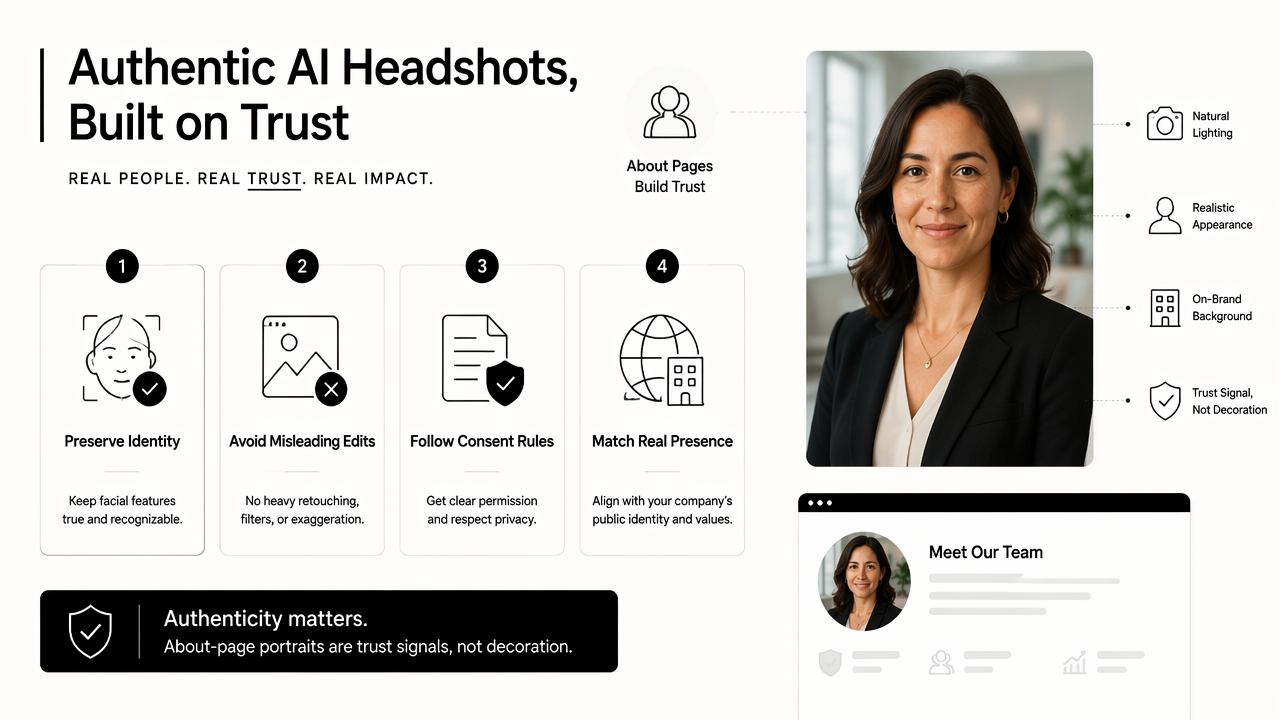
A realistic portrait should look like the employee on a normal workday, only better lit and better framed. Heavy facial changes, unrealistic skin smoothing, or exaggerated clothing can harm credibility when clients later meet the person on video calls.
Brand-safe review rules
Every company should approve AI headshots with a short review rubric:
- Identity match: the person is clearly recognizable.
- No over-editing: skin, teeth, hair, and face shape remain natural.
- Role fit: attire suits the job and company culture.
- Diversity respect: styling does not erase age, ethnicity, hair texture, or personal identity.
- Context match: the image feels appropriate for the website, LinkedIn, press, and sales pages.
- Consent record: the employee agreed to AI-assisted image creation and usage.
Key insight: The safest AI headshot is not the most polished image. The safest image is polished enough for business and accurate enough for real-world recognition.
Common mistakes to avoid
The biggest team-page mistakes include mixing AI headshots with old webcam crops, accepting inconsistent backgrounds, choosing overly stylized portraits, and failing to store the approved prompt or visual rules. These problems make future updates harder.
Another issue appears when companies update only executives. A page with polished leadership portraits and casual staff photos can signal a hierarchy that was never intended. A better approach updates the whole visible team or clearly separates sections by purpose.
For companies extending the same visual identity into brand assets, a coordinated AI logo generator for fitness Shopify brands can support the broader identity system around staff imagery.
What should companies expect from AI headshots in 2027?
Companies should expect AI headshots in 2027 to become more integrated with brand systems, hiring workflows, and personal profile updates. The next wave will likely focus less on one-off image generation and more on repeatable identity kits for employees.
A mature workflow may connect staff portraits with LinkedIn banners, website hero sections, sales proposals, podcast covers, and short-form video thumbnails. That shift favors tools that understand brand consistency across multiple formats, not just face generation.
Likely 2027 buying priorities
| 2027 priority | What it means | Company benefit |
|---|---|---|
| Brand presets | Saved background, crop, attire, and tone | Faster onboarding and fewer approval rounds |
| Identity-safe editing | Better likeness preservation | More trust in AI-assisted portraits |
| Multi-channel exports | One image set resized for web and social | Less design cleanup |
| Team libraries | Central storage for approved portraits | Easier replacements and media requests |
| Consent tracking | Clear usage records | Stronger governance |
With Looktara, teams can think beyond a single about-page refresh and plan a repeatable visual system. For related content formats, the same brand direction can extend into assets such as AI podcast cover art and website hero images. More examples are available on looktara.com.
FAQ
What is the best AI headshot generator for company about pages?
The best option is the tool that produces consistent, realistic, brand-safe portraits across the full team. For many companies, that means choosing a platform with background control, repeatable style settings, easy onboarding, and a clear replacement-photo workflow rather than picking the tool with the most dramatic sample images.
Are AI headshots acceptable for a company website?
AI headshots are acceptable for company websites when employees consent and the final images remain accurate. The image should look like the real person, match the company's tone, and avoid misleading edits. A consistent approval process helps protect trust.
How many source photos are needed for better AI headshots?
Most AI headshot workflows perform better with several clear source images showing the person from slightly different angles and lighting conditions. The exact number depends on the tool. Blurry photos, heavy filters, sunglasses, and group shots usually reduce output quality.
Should every employee use the same background?
Most company about pages look stronger when every employee uses the same or closely related background. Exact matching is not always required, but the page should have a clear visual pattern. Background consistency matters more as team size grows.
Can AI headshots be used on LinkedIn too?
AI headshots can usually be used on LinkedIn if the image rights allow it and the portrait remains accurate. A company may also create matching LinkedIn content, resume imagery, and social graphics so employees present a consistent professional identity.
Conclusion
The best AI headshot generator for company about pages is the one that treats portraits as brand assets, not isolated profile pictures. Strong buyers define the visual standard first, test a small group, approve images as a set, and document a process for future hires.
For a practical next step, create a one-page headshot style guide covering background, crop, attire, lighting, expression, and replacement rules. Then generate a pilot set for leadership or one department, review the portraits together, and roll out the approved system across the company. Teams ready to connect headshots with broader branded content can visit looktara.com and build a more consistent visual presence from the about page outward.
Generated by EarlySEO.com