
TL;DR
AI-generated event profile photos work best when they stay recent, recognizable, and consistent across LinkedIn, event apps, speaker pages, and follow-up messages. The safest approach is to create separate attendee, speaker, and exhibitor versions while avoiding heavy retouching or fantasy-style avatars.
A networking photo has one job: help the right person recognize the same professional from a badge, LinkedIn search, event app, or follow-up email. AI profile pictures for networking events can do that well in 2026 when they look current, human, and consistent. Professionals can create polished options with Looktara, then adapt the same visual identity for event pages, social posts, and content previews such as a fitness LinkedIn post AI generator. AI profile picture: a profile image generated or enhanced with artificial intelligence to represent a real person in a specific professional context.
Table of Contents
What are AI profile pictures for networking events?
AI profile pictures for networking events are realistic headshots or brand portraits created with generative AI for use in event apps, attendee lists, speaker bios, exhibitor pages, LinkedIn, and post-event follow-ups. The best versions look like the actual person today, not a stylized avatar or heavily edited campaign image.
Business networking: the practice of building professional relationships through the exchange of information, introductions, and resources.
Avatar: in computing, a graphical representation of a user, character, or persona.
AI slop: low-effort generative AI content that feels low quality, meaningless, or mass-produced.
Key insight: the goal is not to look artificially perfect. The goal is to be easy to recognize, easy to trust, and easy to remember after the event.
Research on immersive digital identity keeps moving beyond novelty. A 2022 multidisciplinary paper on the metaverse by Dwivedi, Hughes, Baabdullah, and coauthors examined emerging issues around digital presence, practice, and policy, which connects directly to how professionals present themselves in networked spaces (International Journal of Information Management).
Where the same image usually appears
- Event app attendee profile
- Conference speaker page
- LinkedIn profile and posts
- Exhibitor or sponsor listing
- Community platform bio
- Calendar invite thumbnail
- Follow-up email signature
A consistent image lowers friction. When the event badge, event app, and LinkedIn result show the same face, follow-up conversations feel less awkward and more direct.
How should an event headshot be chosen?
An event headshot should be recent, recognizable, well-lit, and aligned with the professional role shown at the event. A good AI-assisted photo improves clarity, background, and polish without changing facial structure, age, skin texture, or personal style so much that in-person recognition becomes harder.
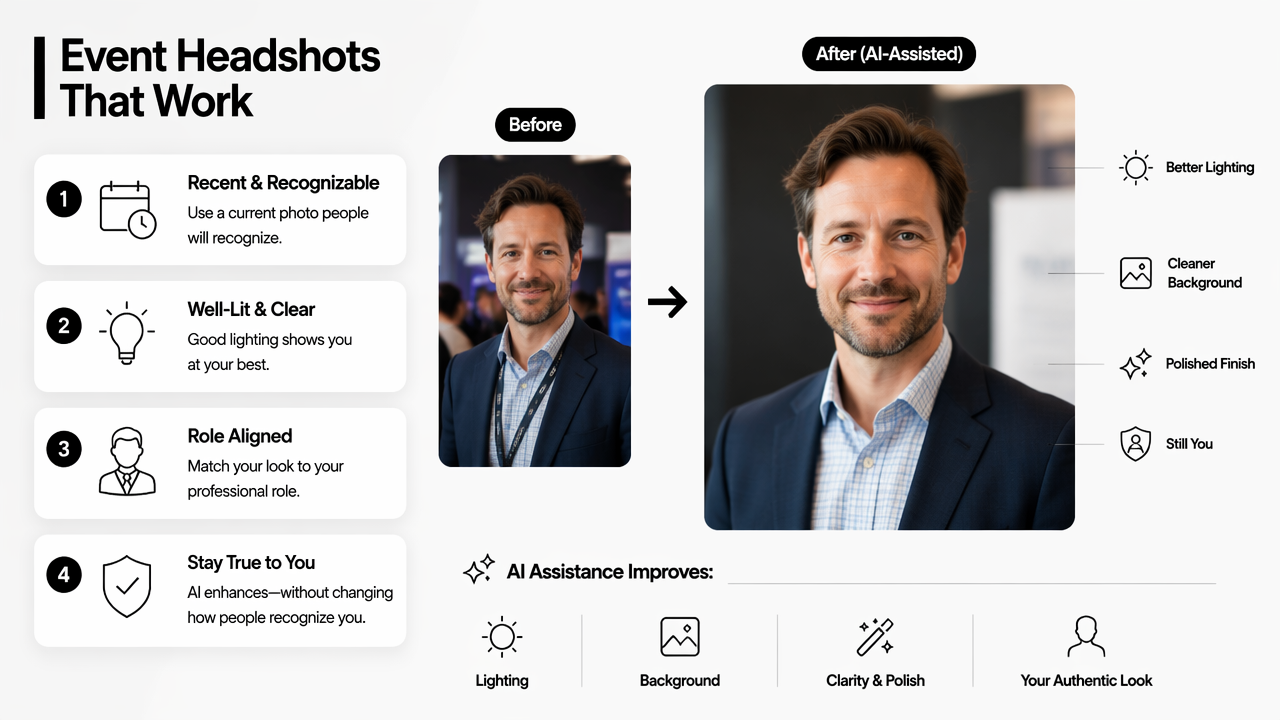
The safest rule is simple: if a new contact would hesitate after seeing the person in a hallway, the image has gone too far. A polished portrait can still show natural expression, normal proportions, and authentic grooming.
OpenAI's 2023 GPT-4 Technical Report describes general advances in multimodal AI capability, but event profile use still depends on human judgment, consent, and context rather than automation alone (arXiv).
Decision table for event-ready profile photos
| Choice | Best practice | Why it matters |
|---|---|---|
| Recency | Use an image that reflects current hair, glasses, facial hair, and style | Recognition matters more than glamour |
| Expression | Choose a relaxed, direct expression | Approachable photos support easier introductions |
| Background | Use a clean office, studio, or neutral event-style background | Busy scenes compete with the face |
| Retouching | Keep edits light and realistic | Heavy edits can reduce trust |
| Cropping | Frame from shoulders up with eyes clearly visible | Small event-app thumbnails stay readable |
| Consistency | Match LinkedIn, event app, and speaker bio | Repetition builds memory after short meetings |
Practical selection steps
- Start with recent selfies or portraits in good light.
- Pick source images that already look like the person in normal work settings.
- Generate several professional versions, not just one.
- Compare each version at small thumbnail size.
- Remove any image with distorted hands, teeth, eyes, jewelry, or badges.
- Use the strongest image across LinkedIn and the event app.
- Save alternate crops for speaker pages, sponsor cards, and social graphics.
For broader professional content around the same event presence, branded visuals can be extended into a fitness Instagram post AI generator or a fitness Instagram infographic AI generator when the event includes workshops, product education, or creator-led sessions.
Which profile versions fit attendee, speaker, and exhibitor roles?
Different networking roles need different photo treatments because each role signals a different level of authority, accessibility, and brand alignment. Attendees need recognition, speakers need credibility, and exhibitors need a consistent company presence across people, booths, and digital materials.
A single master headshot can work across every placement, but role-specific crops and backgrounds perform better in practice. The event app may favor a close crop, while a speaker page may need a wider editorial portrait with room for text.
Role-based photo kit
| Role | Recommended image | Best supporting asset |
|---|---|---|
| Attendee | Friendly head-and-shoulders portrait | LinkedIn profile match |
| Speaker | Confident portrait with clean background | Session graphic or speaker card |
| Founder | Warm, direct portrait with brand color accents | Company one-sheet or pitch deck cover |
| Exhibitor | Consistent team headshots with similar lighting | Booth banner, product image, or event landing page |
| Creator | Authentic portrait with personal visual style | Short-form cover image or social teaser |
| Recruiter | Clear, approachable professional photo | Hiring post or calendar booking page |
Company, legal, support, and tools checklist
- Company fit: the image should match the organization's tone, from formal finance to casual creator brands.
- Legal clearance: only generate images from photos the subject owns or has permission to use.
- Disclosure judgment: avoid implying a live event photo when the image is AI-generated for a profile or promo card.
- Tool quality: check for face consistency, export sizes, background control, and realistic lighting.
- Support needs: teams should confirm whether the tool supports revisions, downloads, and help for nontechnical users.
Visual consistency can extend beyond headshots. Event teams building campaign assets may pair portraits with a fitness Instagram Facebook ad AI generator for paid promotion or a fitness Shopify YouTube thumbnail AI generator for recap videos and speaker clips.
How Looktara handles event-ready profile visuals
Looktara helps professionals turn a practical headshot need into a fuller visual system for networking, social proof, and event promotion. The strongest use case is not a one-off image, but a recognizable identity that carries from attendee profile to LinkedIn post to branded follow-up.
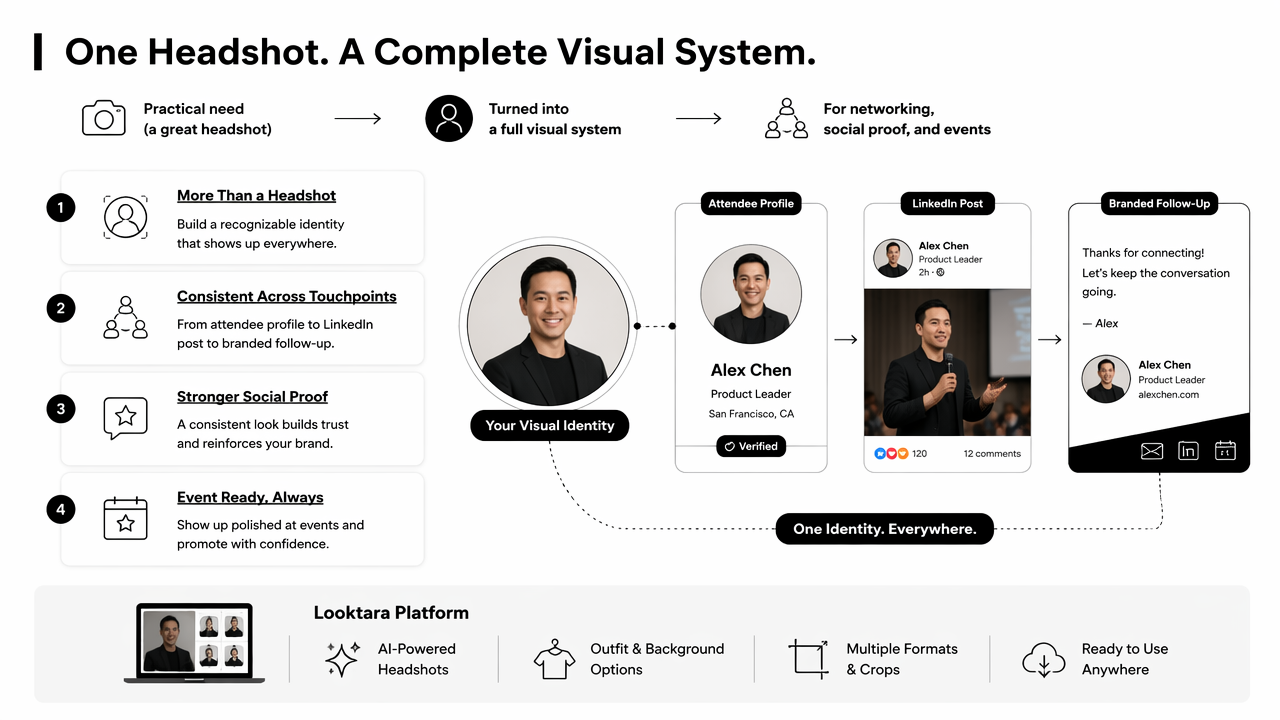
The Looktara platform is useful when entrepreneurs, freelancers, creators, and small teams need polished images without coordinating a full studio shoot. A speaker can prepare a profile photo, session graphic, and social announcement. A founder can keep the same face and brand colors across an event app, LinkedIn post, and follow-up content.
Key insight: event networking works better when a profile photo is part of a visual kit, not an isolated upload.
The broader media layer also matters. Video and image compression standards shape how profile images and event media appear across apps; a 2021 IEEE overview by Bross, Wang, Ye, and coauthors covered Versatile Video Coding and its applications for modern media delivery (IEEE). In plain terms, images still need to be clear after cropping, resizing, and platform compression.
For teams planning an event content calendar, looktara.com can serve as the central place to create matching professional visuals, not just a single portrait.
Simple workflow for a networking photo set
- Create a realistic primary profile image.
- Export a square crop for LinkedIn and event apps.
- Create a wider crop for speaker pages or sponsor pages.
- Build a matching social announcement visual.
- Prepare a follow-up post or recap graphic after the event.
Creators who promote event appearances across multiple channels can also adapt the same identity into a fitness Shopify TikTok cover AI generator, keeping the face, colors, and topic consistent from discovery to follow-up.
FAQ about AI event profile photos
AI event profile photos should be treated like professional identity assets, not novelty images. The most common questions involve authenticity, platform fit, privacy, and whether a photo should look formal or casual.
Should an AI-generated profile photo be disclosed?
Disclosure depends on context. A realistic AI-assisted headshot used as a profile image usually does not need a long explanation, but it should not mislead people into thinking it documents a real moment from the event. Speaker pages, press kits, and sponsored materials should follow organizer and company policies.
Can the same image be used on LinkedIn and an event app?
Using the same image across LinkedIn and an event app is usually smart because it improves recognition before and after the event. The crop may change by platform, but the face, expression, and overall style should stay consistent so a contact can connect the profile to the in-person conversation.
What makes an AI headshot look untrustworthy?
An AI headshot can look untrustworthy when skin is overly smooth, eyes look glassy, teeth appear distorted, accessories warp, or the person looks much younger than reality. Overly luxurious backgrounds can also feel mismatched for practical networking. Subtle polish works better than dramatic reinvention.
What size should an event profile picture be?
Most event apps display profile photos as small circles or square thumbnails, so a high-resolution square image with the face centered is the safest master file. A wider version can support speaker pages, sponsor profiles, and social announcements. Final requirements should follow the event platform's upload rules.
Conclusion
AI profile pictures for networking events work best when they support recognition, trust, and follow-up. The practical next step is to create one realistic master portrait, then export attendee, speaker, exhibitor, and social versions from the same visual identity. Keep edits light, match LinkedIn and event apps, and review every image at thumbnail size before uploading. For a polished set of event-ready visuals, visit looktara.com and build the profile image, announcement graphic, and follow-up assets from one consistent style.
Generated by EarlySEO.com