
TL;DR
Generate the creator portrait separately, then add headlines and branding in a reusable design template. Keep the face recognizable, reserve clear title space, and check every cover at mobile size before publishing.
A strong Pinterest cover gives the portrait and the headline separate jobs: recognition and relevance. An AI photo generator for Pinterest creator pin covers can help build the portrait asset, while a graphic editor handles the title, colors, and final composition. For creators exploring Looktara, that separation provides a practical starting point for a recognizable content series rather than a collection of unrelated images.
Table of Contents
What is an AI photo generator for creator pin covers?
An AI photo generator for creator pin covers produces portrait imagery that becomes one component of a Pinterest graphic. The photo establishes a recognizable person; the surrounding design communicates the content topic. Treating those as separate assets gives creators direct control over cropping, headline placement, and consistency across a series.
Portrait-led pin cover: A Pinterest graphic that pairs a prominent creator portrait with a topic-specific headline and repeatable brand styling.
Negative space: An intentionally uncluttered area reserved for text or other design elements.
Graphic composition: The arrangement of the portrait, headline, background, and brand marker into the finished cover.
Photo generation versus finished-pin generation
Portrait generation and finished-pin generation solve different production needs. The supplied competitor research describes Made to Spark as turning links or keywords into pins, while VideoWeb AI describes model selection and reference-image uploads. Those are workflow descriptions, not evidence of better performance.
| Approach | Main output | Best fit |
|---|---|---|
| Portrait-first generation | A reusable creator image | Personality-led content series |
| Link-to-pin generation | A design based on a URL or keyword | Turning existing articles into graphics |
| Template-based composition | An editable layout using supplied assets | Precise headlines and repeatable branding |
For a consultant publishing career advice, the portrait-first approach makes sense when personal recognition matters. A recipe publisher may prefer a food-led cover instead. A face should serve the topic, not become a mandatory decoration.
How can creators separate portraits from pin design?
Creators can separate portrait generation from pin design by completing the image asset before assembling the graphic. A simple production order keeps both tasks focused:
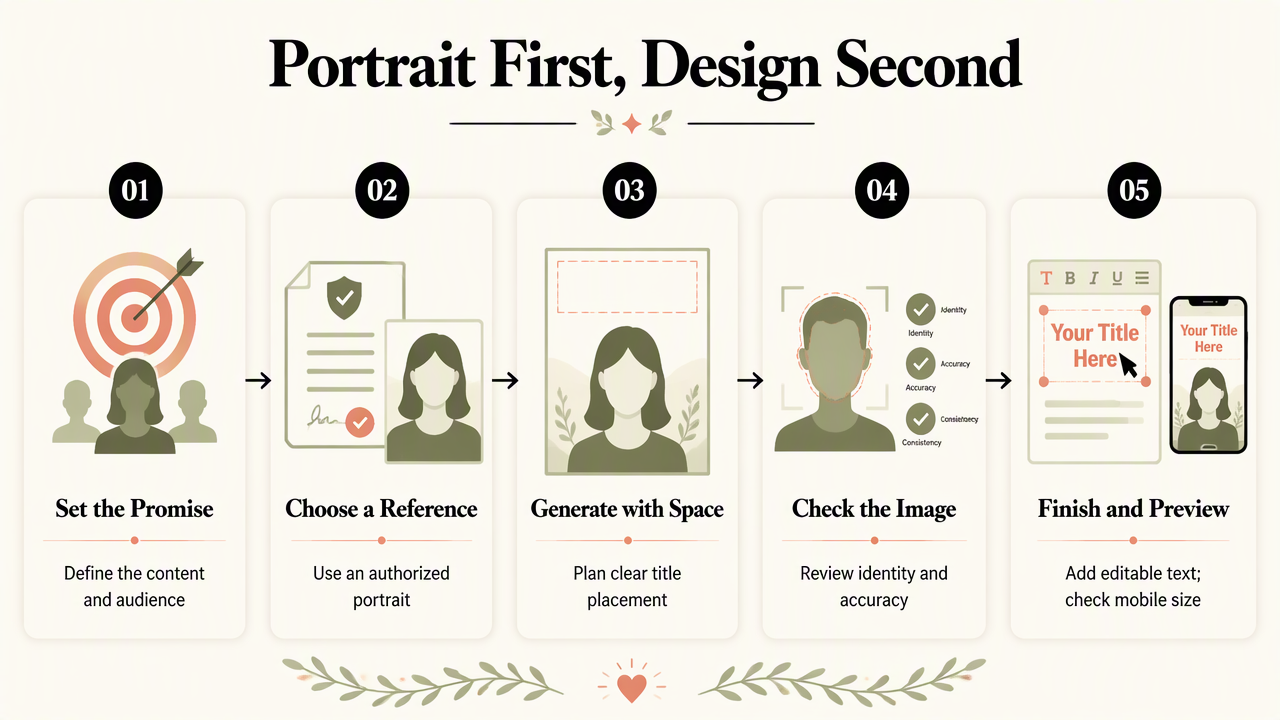
- Define the content promise and audience.
- Select an authorized portrait reference.
- Generate an image with planned title space.
- Check identity and visual accuracy.
- Add editable text in a graphic editor.
- Preview the finished cover at mobile size.
Build a portrait brief around the headline
A portrait brief should describe the placement as clearly as the person. For a career coach, a useful brief might read: Professional creator portrait, relaxed expression, plain warm-gray background, subject positioned on the right, clear left-side space, soft natural lighting, no lettering or logos.
The instruction establishes a composition target; it doesn't guarantee a particular output. Reference-image support and identity controls should be checked in the selected tool before production begins.
Choose wardrobe and expression to match the content. A business tutorial might use a calm, direct expression, while a fitness motivation series could use a more energetic pose. The topic should guide the styling without changing the creator's recognizable appearance.
Keep copy editable through publication
Editable text lets a single portrait support several accurate content promises. A design tool such as Canva can hold the headline, label, and brand colors separately from the photo, making revisions easier than regenerating the whole cover.
A fitness creator promoting weekly advice can explore newsletter-focused Pinterest pin imagery, then compose a headline tied to the actual newsletter issue.
Production rule: Generate the person and scene first; compose the message afterward.
Save the portrait, editable design file, and export under matching filenames, such as mobility-series-portrait-01 and mobility-series-pin-01. Clear naming keeps approved assets connected to their finished covers.
Which layouts keep portraits and titles readable?
Portrait-led covers work best when the face and headline occupy distinct visual zones. Start with one reusable layout, then adjust the portrait crop for each topic. As a practical design starting point, a 1000 × 1500-pixel canvas provides a 2:3 working format; current Pinterest publishing requirements should be checked before export.
Three reusable creator-cover templates
Three simple layouts give creators useful options without requiring a fresh design for every post. The proportions below are starting suggestions, not measured performance benchmarks.
| Template | Portrait placement | Title placement | Suitable content |
|---|---|---|---|
| Side-by-side | Right third of canvas | Left-side text block | Tutorials and numbered advice |
| Portrait above panel | Upper half | Solid panel below | Interviews and personal stories |
| Corner portrait | Lower corner | Large upper text area | Checklists and resource promotion |
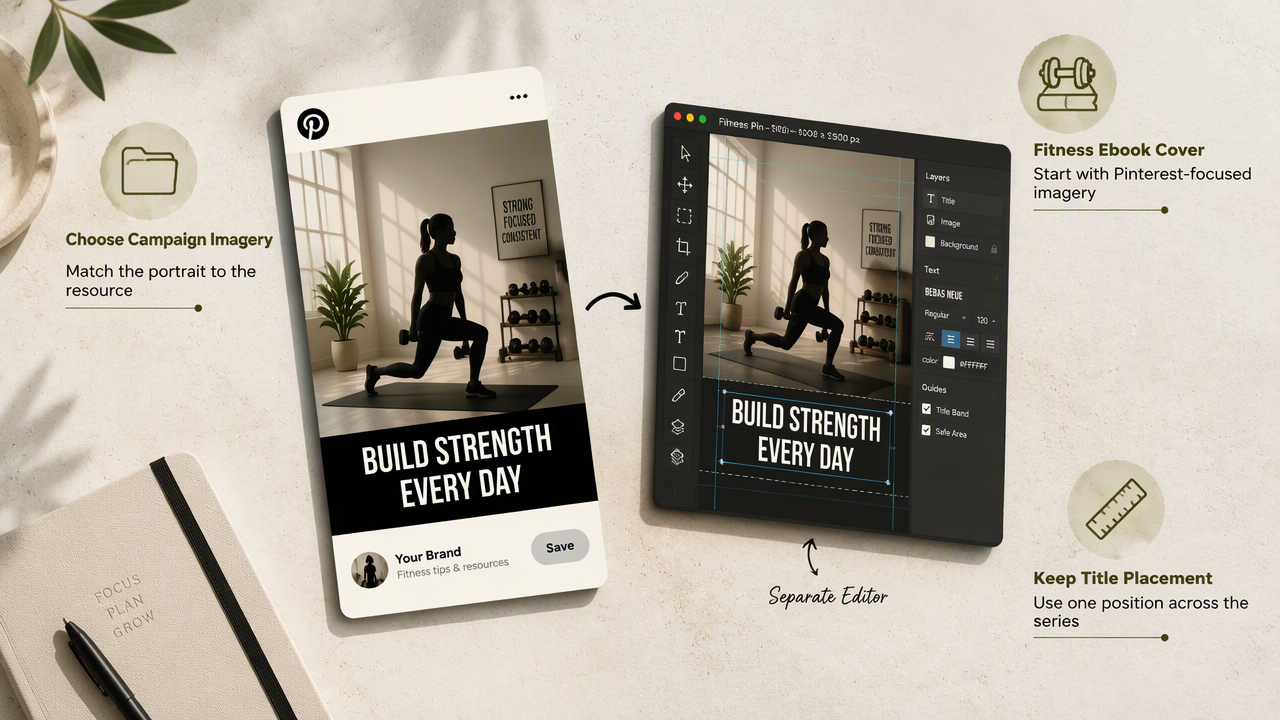
Keep the series label in the same location across all three. Repeated placement creates a familiar visual cue while the headline signals the new topic.
For fitness hosts promoting episodes, Pinterest podcast-cover imagery offers a relevant category to explore. A portrait-above-panel layout can separate the host's face from an episode-specific title.
Mobile checks that catch layout problems
A mobile preview should test whether the content promise remains understandable when the graphic becomes small. Readability at full editing size isn't enough.
- Shrink the cover to a phone-feed-sized preview.
- Confirm the headline can be read without zooming.
- Keep lettering clear of eyes, mouth, and facial contours.
- Check that title text stands apart from the background.
- Remove decorative details that compete with the message.
- Inspect the exported image, not only the editable file.
If a headline needs several cramped lines, shorten the promise rather than squeezing the type. For example, Five Desk Stretches is a clearer cover title than a sentence describing every benefit of the routine. Supporting detail belongs in the destination content.
Inspect the portrait separately for altered facial features, implausible accessories, or inaccurate clothing details. A recognizable face matters more than an impressive background.
How Looktara fits the portrait-to-pin workflow
A Looktara workflow can be organized around selecting portrait imagery for a specific creator campaign, then composing the finished pin in a separate editor. The site's Pinterest-focused categories offer starting points for fitness content. Creators should match the imagery to the destination asset and keep title placement consistent throughout the series.
Match the image category to the content asset
The strongest category choice follows the material being promoted, rather than a general preference for attractive pictures.
- Downloadable guide: Explore fitness ebook-cover imagery for Pinterest for a portrait-led resource campaign.
- Social content series: Consider fitness Instagram-to-Pinterest pin imagery when adapting a recognizable creator presence across channels.
- Store content: Explore fitness Shopify Pinterest pin imagery when the cover leads to a relevant store page.
The destination should determine the headline. A guide cover should promise the guide's subject; a store-linked pin should describe the actual offer.
Create a small, controlled series
A controlled series makes design decisions easier to evaluate. Start with three covers using the same portrait style, typeface, and brand label, but different topic-specific headlines. Record the destination URL beside each design so the visual promise stays connected to the content.
The 2023 paper Immersive Sampling: Exploring Sampling for Future Creative Practices in Media-Rich, Immersive Spaces, by Evgeny Stemasov, David Ledo, and George W. Fitzmaurice, examines sampling in creative practice. It provides related creative-method context, not Pinterest performance evidence.
For a 2026 workflow, the useful habit is deliberate selection: retain approved assets, document design choices, and change one visible element at a time during comparisons.
FAQ: AI portraits for Pinterest covers
These practical answers distinguish portrait creation, graphic editing, and publication checks.
Key distinction: A convincing portrait is an asset; a useful pin also needs a clear content promise.
Can an AI portrait generator make the entire pin?
An AI portrait generator may produce a complete-looking graphic, depending on the tool, but portrait-first production keeps headlines and branding independently editable. Creators needing precise copy placement can generate the image first and finish the layout in a graphic editor. Full-pin tools serve a different need: assembling more of the design in one workflow.
Should every Pinterest cover feature the creator's face?
A creator's face belongs on the cover when personal expertise, personality, or recognition supports the content. Product details, recipes, and visual instructions may need the subject itself to dominate instead. A useful decision test is whether the portrait helps explain who is offering the advice without displacing what the pin promises.
What should creators check before publishing AI portraits?
Creators should check recognizable identity, reference-photo permissions, tool usage terms, and the accuracy of anything depicted. A generated image shouldn't imply a real event, product result, or endorsement that didn't occur. The final review should also confirm that the headline matches the destination and that the exported cover remains readable at mobile size.
Conclusion
Build one portrait brief, one editable layout, and three topic-specific covers before expanding production. Keep the approved face, title zone, and brand label consistent, then compare results against each pin's purpose. Creators ready to plan a portrait-led campaign can explore Looktara at looktara.com and choose a relevant image category before composing the first cover.
Generated by EarlySEO.com