
TL;DR
When an AI photo generator changes teeth, the result may reflect reconstructed detail rather than the original smile. Clear reference photos, restrained prompts, and a dental-likeness check can help; a lightly edited original remains the safer choice when exact appearance matters.
A convincing AI headshot can still contain a smile that belongs to someone else. When an AI photo generator changes teeth, small differences in spacing, tooth shape, or braces can make an otherwise polished portrait feel unfamiliar.
For job seekers, freelancers, creators, and dating-app users, the goal is often recognition rather than cosmetic perfection. A useful review separates flattering lighting from changes to personal features.
Dental likeness: The degree to which a generated portrait preserves a person's visible tooth shapes, spacing, dental appliances, and natural smile.
Article navigation
- Why dental details change
- The dental-likeness check
- Practical source-photo adjustments
- A professional-image workflow
- Frequently asked questions
Table of Contents
Why does an AI photo generator change teeth?
An AI photo generator changes teeth because it generates visual details rather than necessarily copying every feature from a source photograph. Small, partly hidden structures such as tooth edges, gaps, and braces leave room for approximation. Lighting, expression, image quality, and editing instructions can influence the reconstructed mouth.
Generation is different from preserving original pixels
A newly generated portrait isn't simply an original photograph with a different background. Depending on the tool and workflow, parts of the face may be reconstructed along with clothing, lighting, and pose.
Generative reconstruction: Creating image detail based on learned visual patterns and supplied references or instructions.
Localized retouching: Editing a limited area of an existing photograph, ideally leaving unrelated features unchanged.
The distinction matters. A request for a new expression gives the model more to invent than a request to adjust exposure on an existing smile.
Small mouth details provide incomplete evidence
A distant selfie may show the overall smile clearly while offering little detail about individual teeth. Compression, glare, lip overlap, and motion blur can obscure the features needed for a close match.
Prompts such as perfect smile or flawless teeth also invite cosmetic interpretation. A polished result can therefore be plausible without being personally accurate.
What the research does and doesn't establish
A realistic-looking generated face is not proof that every dental feature matches the reference.
The 2022 systematic literature review on deepfake detection by Rana and colleagues covers synthetic-media detection. The 2022 survey on deepfake creation and detection by Nguyen and colleagues addresses the broader creation-and-detection field.
These sources provide background on synthetic imagery, not a dental-preservation benchmark. Their supplied metadata doesn't establish how often generators alter teeth or prove that a particular fix works.
Which dental details need a likeness check?
A dental-likeness check should compare tooth spacing, visible tooth shapes, braces, natural color, and the shape of the smile against a clear original photograph. Overall attractiveness isn't enough: a portrait can look professional while changing features that colleagues, clients, or friends recognize.
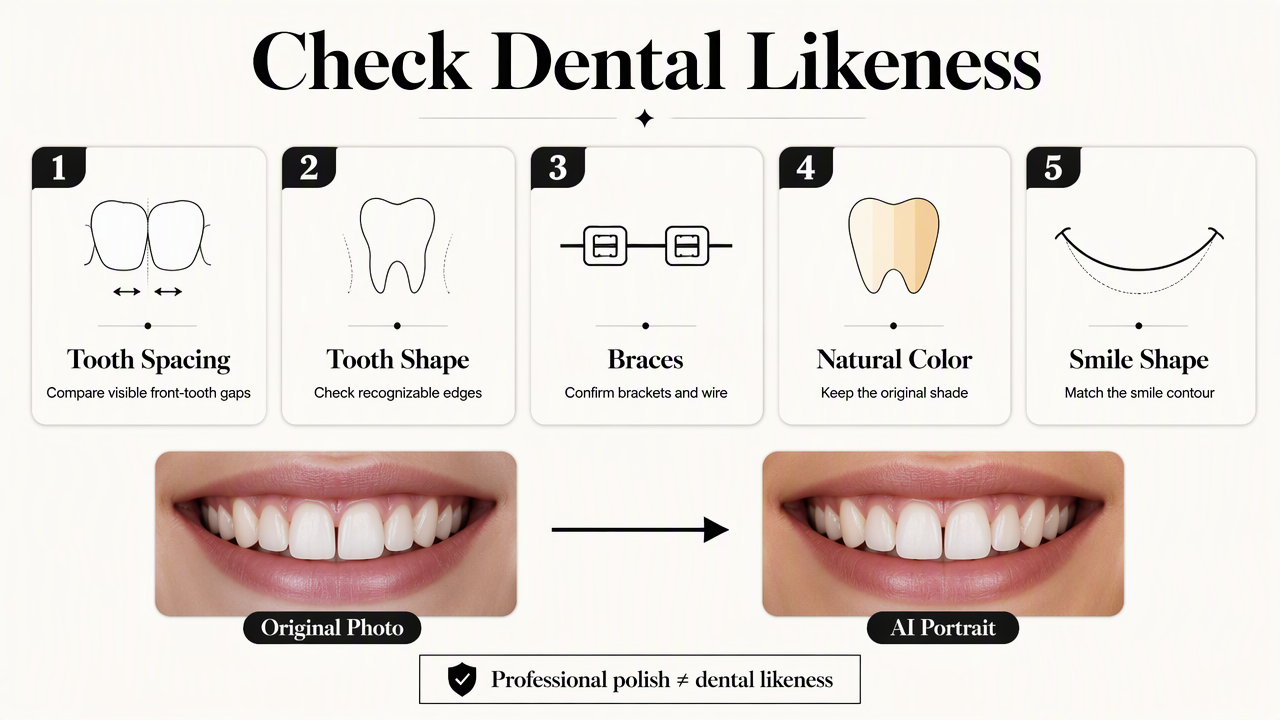
Common changes and their visual clues
Different expressions expose different amounts of the mouth, so comparisons work best with a similar smile and camera angle.
| Feature | Change to check for | Useful comparison |
|---|---|---|
| Tooth spacing | A gap disappears or a new gap appears | Spaces between visible front teeth |
| Tooth shape | Teeth become uniformly rectangular | Relative widths and edge shapes |
| Braces | Brackets disappear, blur, or change position | Visible brackets and wire placement |
| Tooth color | Teeth become unusually bright or uniform | Color under comparable lighting |
| Smile shape | Mouth widens or lip curvature changes | Mouth corners and lip position |
| Visible dental work | A distinctive feature is replaced | The same feature in an original photo |
A practical review before publishing
A two-scale inspection balances detail with the way the image will actually appear on a profile.
- Compare the generated portrait with an unfiltered original showing a similar expression.
- Inspect the mouth at full size for merged edges, inconsistent spacing, and altered appliances.
- Review the image at its intended profile size for overall recognition.
- Ask someone familiar with the subject to assess whether the smile feels accurate.
- Keep only images that meet the intended standard of authenticity.
Expression differences aren't automatically errors. A broader smile can reveal more teeth naturally. The key question is whether the visible features remain consistent, not whether both images contain identical mouth pixels.
How can source photos reduce unwanted dental changes?
Source photos can reduce unwanted dental changes by making the intended smile easier to interpret, though they cannot guarantee exact preservation.
- Select sharp, unfiltered references.
- Include a clear natural smile.
- Use soft, even lighting.
- Keep dental features consistent across references.
- Request preservation rather than cosmetic improvement.
- Review each result before publication.
Match the source-photo adjustment to the problem
Targeted changes are more useful than repeatedly generating portraits from the same unclear evidence.
- Spacing looks different: Add a front-facing reference with clearly visible front teeth and no beauty filter.
- Braces are missing: Include a sharp photo showing the current appliance; avoid mixing older, pre-braces photos with current references.
- Smile shape drifts: Choose references with the expression intended for the final portrait.
- Teeth look too white: Remove whitening or perfection language and use references without strong glare.
- Mouth detail looks blurred: Replace distant or compressed images with a clearer original, if available.
A mixed reference set can create ambiguity. Photos from before and after dental treatment may represent different appearances, even when both sets show the same person.
Use restrained instructions, then choose the right fallback
Where a tool accepts prompts, instructions can request natural tooth color, existing gaps, current braces, and the original smile shape. Such wording communicates the goal; it doesn't lock the model to an exact dental structure.
For example, a preservation-focused instruction could be: Keep the reference smile, visible tooth spacing, and braces; change only clothing and background. That example is suggested wording, not a tested guarantee.
Repeated regeneration may produce alternatives, but more attempts don't establish authenticity. When accurate dental appearance matters most, a real photograph with restrained exposure, crop, and background adjustments offers greater control over the original mouth.
The limit of practical mitigation
Better references and narrower instructions are quality-control measures, not guaranteed fixes. Cosmetic teeth editing and faithful dental preservation serve different goals.
How Looktara handles this
Looktara fits this task as a professional-image option paired with a reference-led selection process. The useful objective is a portrait that supports the subject's professional identity, with lighting, styling, and expression chosen around the intended use.
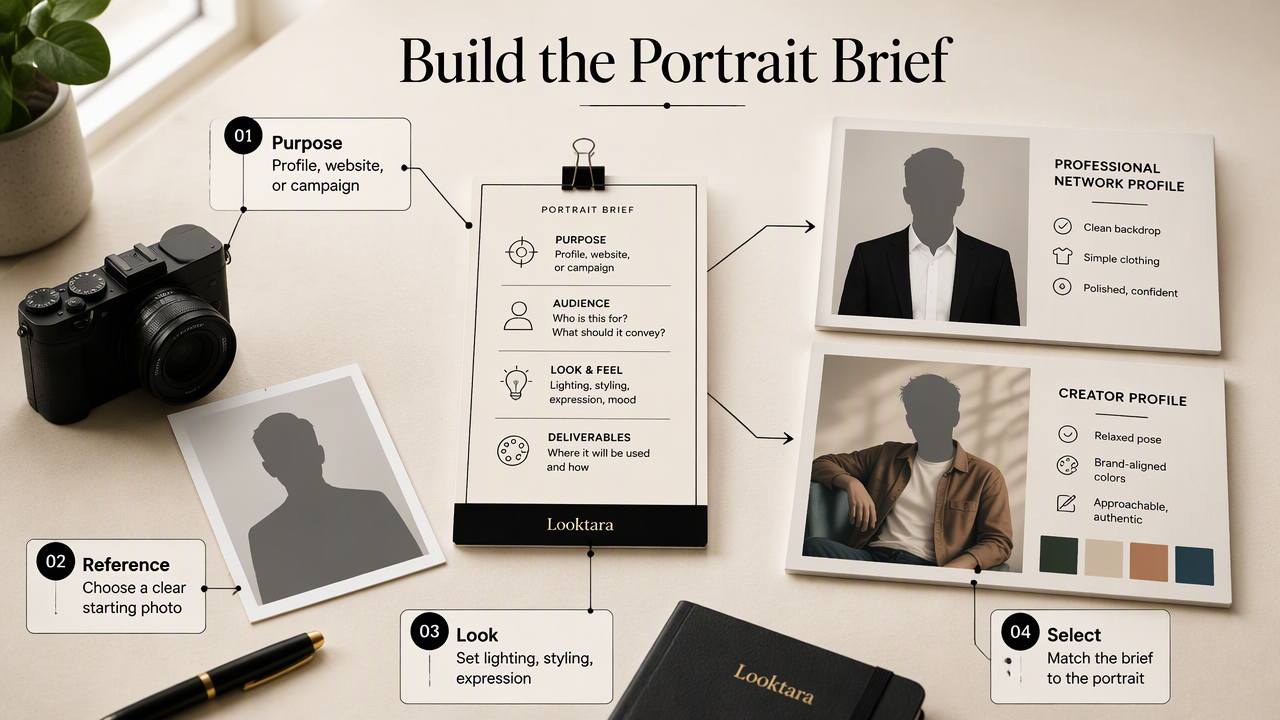
Build a brief around recognition
A clear image brief gives the selection process a positive target before generation begins. For LinkedIn, that might mean an approachable expression, simple clothing, and a clean background. For a creator profile, the brief might emphasize consistent brand colors and a relaxed pose.
- Purpose: Identify the profile, website, or campaign where the portrait will appear.
- Expression: Choose a natural open smile or a comfortable closed-mouth expression.
- References: Gather current photographs that represent the intended appearance.
- Selection standard: Prioritize recognition alongside visual polish.
The Looktara platform can be considered within that professional-image workflow. Current options can be reviewed at looktara.com, with the source photos and intended expression prepared in advance.
FAQ: Preserving an authentic smile
Authentic smile selection depends on the intended use, the available references, and whether original dental detail needs to remain unchanged.
Can a prompt guarantee unchanged teeth?
A prompt cannot be treated as a guarantee of unchanged teeth. Preservation wording can explain the intended result, but generated detail still requires comparison with the original. For exact fidelity, the safer workflow is an existing photograph edited without reconstructing the mouth, followed by a final visual check.
Does teeth whitening change dental likeness?
Teeth whitening can change dental likeness when the brightness becomes noticeably different from the person's usual appearance. Color-only editing is narrower than reshaping teeth, but both deserve review. Natural variation, shadows, and lighting should remain believable; uniformly bright teeth aren't automatically a better professional-photo choice.
Is a closed-mouth portrait a reasonable alternative?
A closed-mouth portrait is a reasonable alternative when that expression feels natural for the subject and suits the intended profile. It avoids displaying dental detail, but it doesn't establish that the rest of the generated face is accurate. Recognition, lip shape, expression, and overall likeness still need review.
Can generated smiles predict dental treatment results?
Generated smiles should not be treated as predictions of dental treatment results. A cosmetic image illustrates an appearance, not a clinical assessment of teeth, gums, bite, or treatment suitability. Decisions about orthodontics, whitening, or restorations require advice from a qualified dental professional rather than conclusions drawn from a generated portrait.
Conclusion
A recognizable expression makes professional imagery more personal and useful. The next step is to prepare current, clear references, define the desired smile, and apply the dental-likeness checklist before publishing. For a professional-image project with Looktara, bring that brief to the selection process and choose the portrait that best represents the subject.
Generated by EarlySEO.com